
Gemini Argon 4 for Robotics: 7 Key Demos & Features
Explore seven Gemini 4 Argon robotics demos, from zero-shot robot control and Real2Sim physics simulations to automated data labeling and self-improvement. Learn how its reasoning loop could transform robotics development.

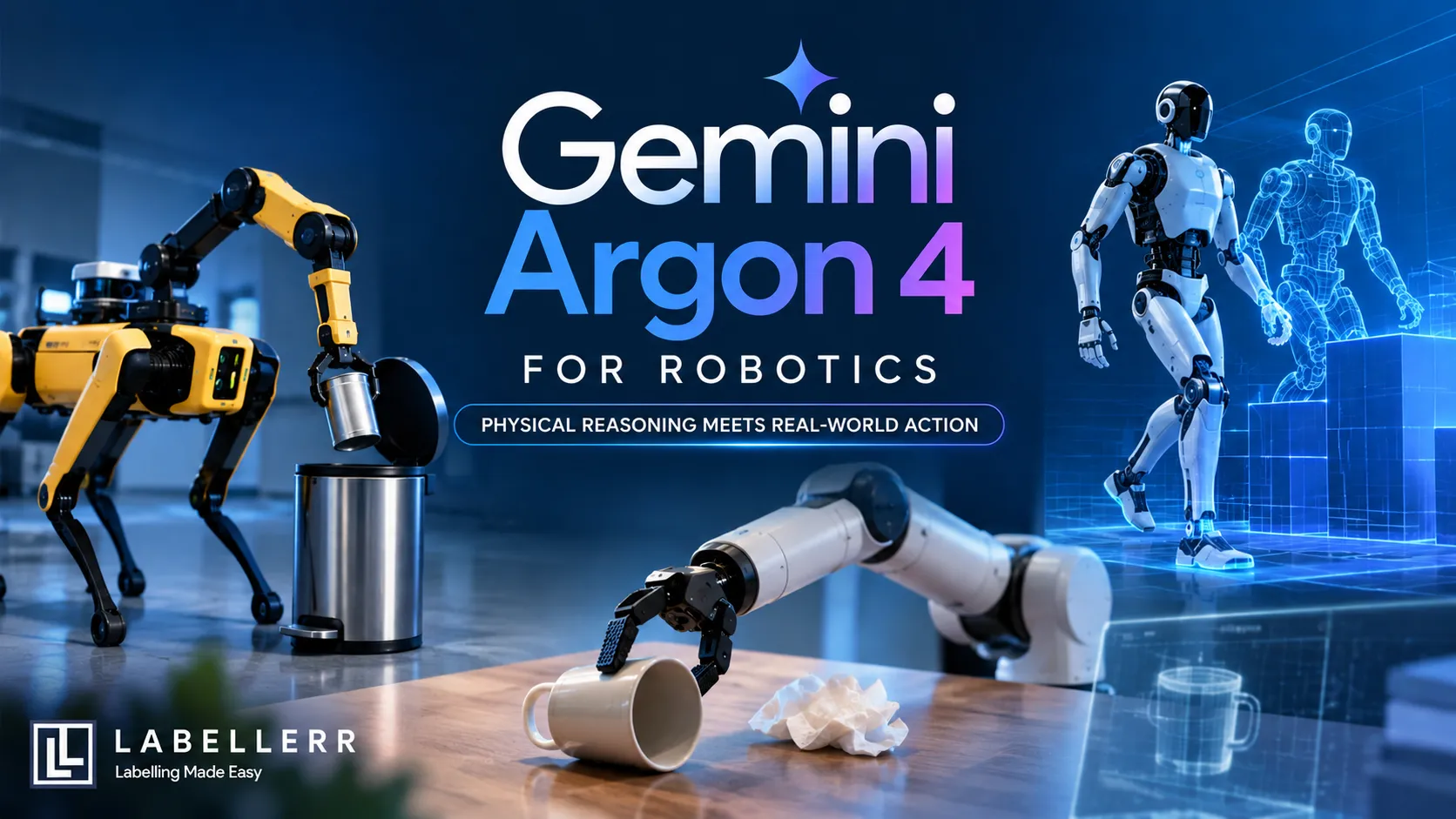
A robot arm sees a fallen mug and a crumpled napkin. It has no training run for this task. A model reads the camera feed, writes a few lines of code, and the arm sets the mug upright.
That is zero-shot robot control. Google showed it with Gemini 4 Argon on October 13, 2026. The same model also builds physics simulations, labels robot data, and improves its own moves.
This guide covers the seven biggest demos. It also explains how the system works and how to start.
What Is Gemini 4 Argon for Robotics?
Gemini 4 Argon is a general-purpose physical reasoning model. Google says it marks a step change in physical understanding, code generation, and visual-semantic reasoning.
The headline number comes from ERQA, the Embodied Reasoning benchmark. It tests spatial and physical problems in 3D scenes. Using pure reasoning, Argon scores 87%. Google says that beats every other frontier model.
That score comes from Google's own post. Treat it as a strong claim until outside teams test it.
Google groups the demos into four areas: robot control, Real2Sim, physical understanding, and research with self-improvement.
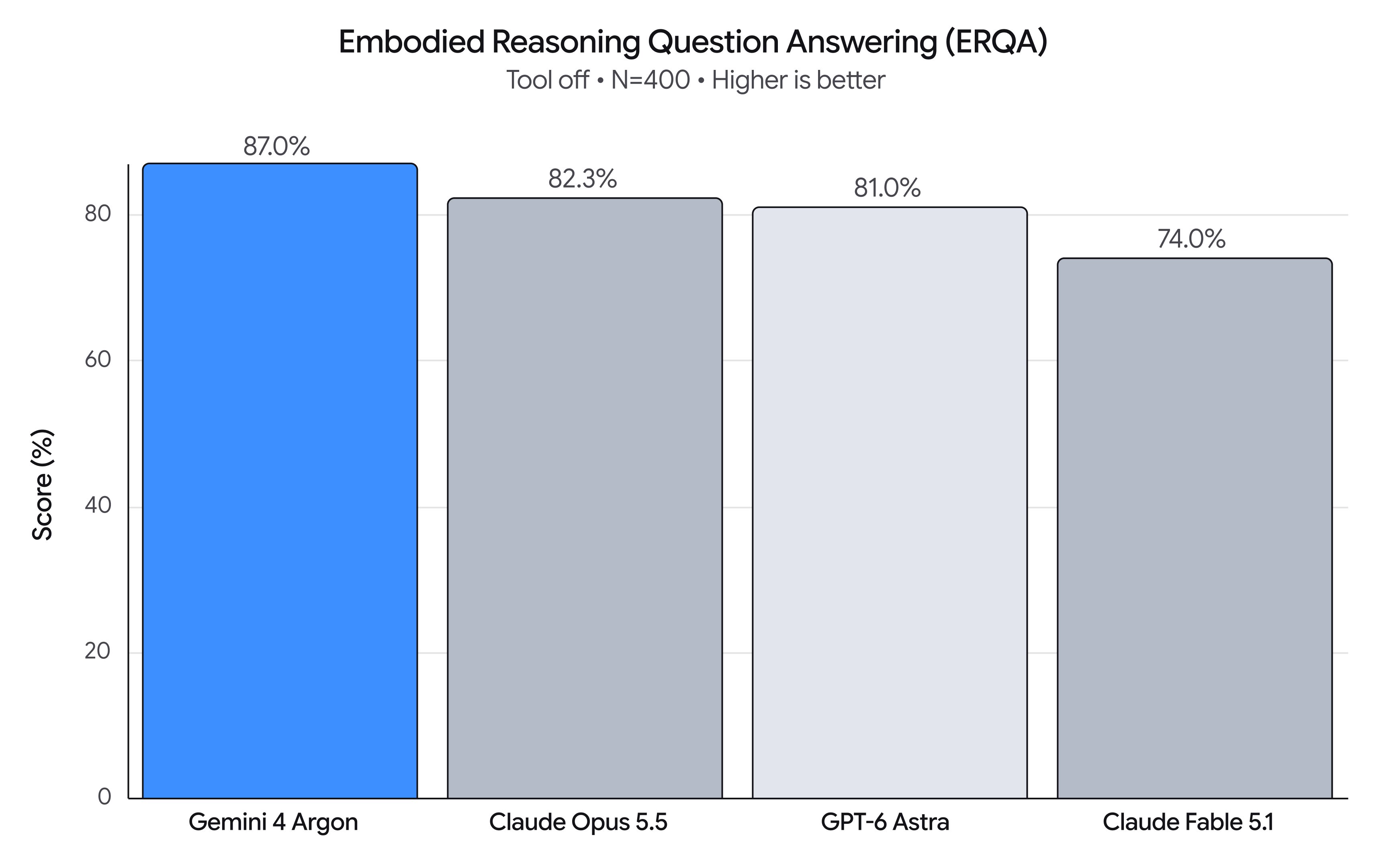
ERQA benchmark chart
Data Source
How the Argon Robotics Loop Works
Google has not shared parameter counts or layer details for Argon. The post does show the system around the model. That loop is the architecture that matters for robots.
It has five steps
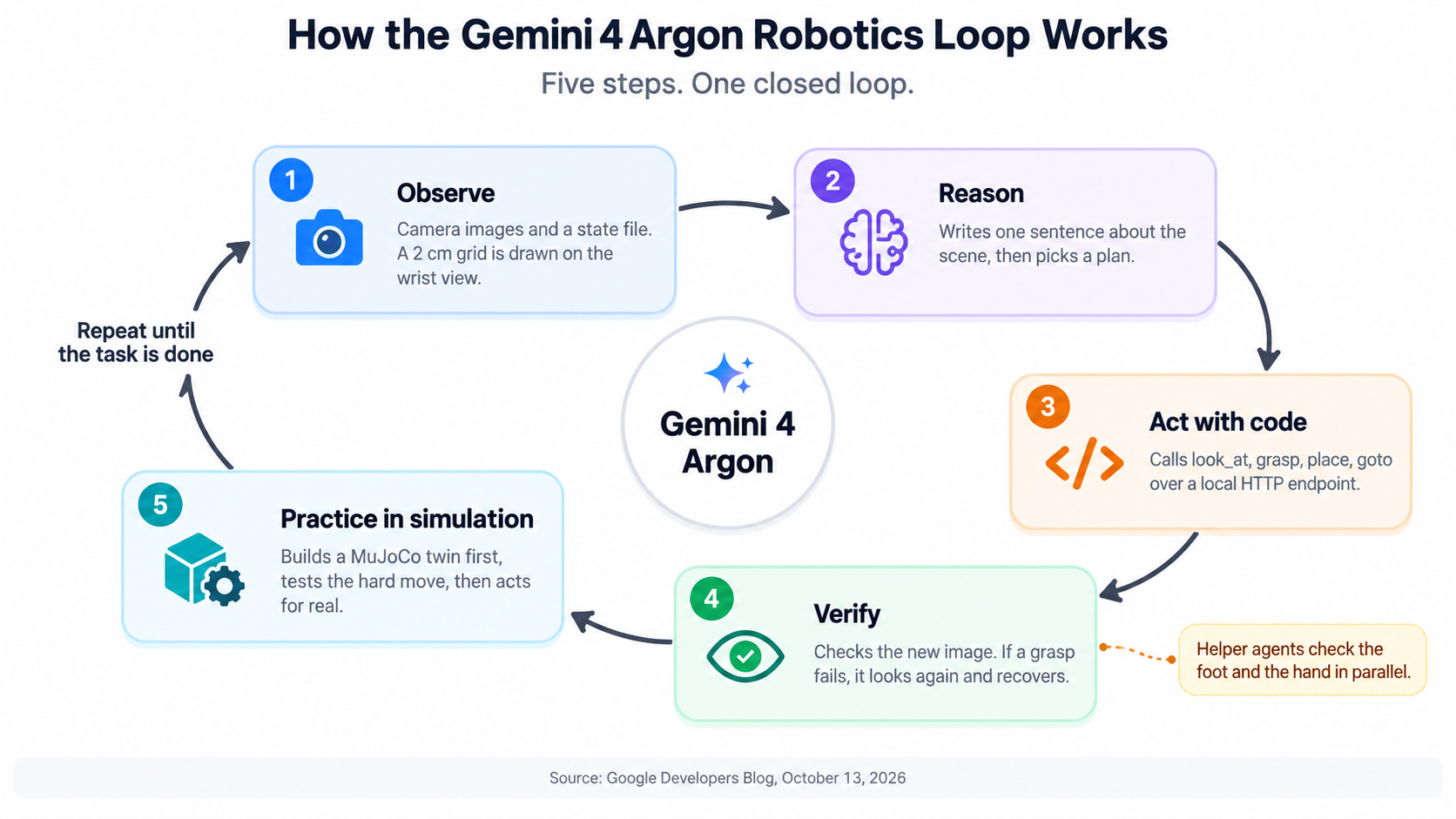
Five-step loop
Observe
Argon gets camera images and a state file. In the arm demo, the wrist image carries a drawn grid. Yellow numbers mark world coordinates in centimeters. A cyan crosshair marks the gripper.
Reason
The model writes one sentence about what it sees. Then it picks a plan.
Act with code
Argon calls simple primitives such as look_at, grasp, place, and goto. It sends them to the robot over a local HTTP endpoint. This style is called code as policies.
Verify
After each move, it checks the new image. If a grasp fails, it looks again and recovers.
Practice in simulation
For hard moves, it builds a MuJoCo twin first. It tests there, then acts on real hardware.
Argon can also spawn helper agents. The Spot demo uses a two-agent swarm. One agent checks the foot. The other checks the hand.
Quick Comparison of the Seven Demos
| # | Demo | Area | Key detail |
|---|---|---|---|
| 1 | Spot trash bin | Control | 12-DoF legs, 6-DoF arm |
| 2 | Zero-shot arm | Control | 2 cm visual grid |
| 3 | Omni steering | Control | 33-step rollout |
| 4 | Real2Sim | Simulation | 76-DoF humanoid |
| 5 | Hindsight labels | Understanding | 17 atomic primitives |
| 6 | Odd ball puzzle | Understanding | Solved in 3 weighings |
| 7 | Self-improvement | Research | 56% to 75% success |
1. Spot Learns to Use a Foot-Pedal Trash Bin
Argon controls a Boston Dynamics Spot with 12-DoF legs and a 6-DoF arm. The goal is to drop soda cans into a foot-pedal bin.
First, Argon builds an articulated MuJoCo twin of the bin. It practices a three-leg balance there. Then it steps on the real pedal.
Before the step, a two-agent swarm checks the foot target and the hand position. Only then does Spot release the can. This is real-to-sim-to-real in a single run.
Video Source
2. Zero-Shot Arm Control With a Visual Grid
A simple arm must stand a fallen mug upright and put a napkin inside. Argon plans over several turns. It reads a wrist image with a 2 cm world grid drawn on top.
The prompt also lets the model pick how often to look. Coarse mode uses 2 to 4 calls. Hover verify uses 4 to 7. Fine visual servoing uses 8 to 20.
That choice matters. Easy moves need fewer checks. Tight moves need more.
Video source
3. Steering a Video World Model
Argon also steers Gemini Omni, a video world model. The task is to rearrange five Scrabble tiles to spell A-R-G-O-N.
Argon does not use one fixed prompt. It writes timestamped action prompts, inspects keyframes from the rollout, and refines the next prompt. The result is a 33-step steered rollout.
The prompt rules are simple. Use one single-direction action at a time. Keep idle hands out of the camera view.
Video Source
4. Real2Sim From Robot Video, Human Video, and Sketches
Argon builds physics twins from three kinds of input.
From a robot teleoperation episode, it builds a MuJoCo scene. It tunes assets until renders and fingertip force timing match the logged data. The prompt bans cheats, such as welds or external forces.
From an egocentric human video, it retargets the hand path onto a 76-DoF humanoid with 22-DoF hands. It runs at 500 Hz.
From a hand-drawn sketch, it builds a humanoid throw. All six target boxes fall in closed-loop physics. It exports a Blender 4.5 Cycles render.
Video source
5. Hindsight Labels and Value Functions
Argon watched an ALOHA 2 robot fold an origami fox over 136 seconds. It produced four label levels: one episode goal, six subtasks, 17 atomic primitives, and a quality control layer.
The quality layer holds progress flat during fumbles and retries. That keeps bad segments from teaching a policy the wrong lesson.
Argon also scored a 60-second ring-sorting episode from a human UMI dataset. It split the run into 28 segments with positive, neutral, and negative progress slopes.
Video Source
6. Solving the Odd Ball Puzzle With Vision Only
Twelve pool balls look the same. One is heavier or lighter. Two Franka FR3 arms must find it with a two-pan scale.
Argon wrote the MuJoCo environment and the solver. The solver uses stereo RGB cameras. It triangulates each ball and reads the scale tilt from pixel disparity. It isolates the odd ball within three weighings.
This tests perception, planning, and logic together.
Video source
7. Self-Improvement in Simulation and on Hardware
From one RGB photo of a real tabletop, Argon built a calibrated simulation twin. It defined new tasks and collected more than 4,500 domain-randomized episodes.
Google reports that real-world success rose from 56% to 75%. Completion time fell from 35 seconds to 24 seconds.
On a 6-DoF SO-101 arm, Argon improved its own pick-and-place across three runs. Time dropped from 58.9 seconds to 22.9, then 17.4. The last drop landed dead center.
Argon also rebuilt landmark robotics papers as browser labs in MuJoCo WebAssembly. The post cites 68 such sandboxes.
Video source
Why This Matters for Robot Data
Robot teams spend huge effort on data. They must collect it, label it, and filter out bad runs.
Argon touches each step. It builds simulated episodes. It labels real ones. It scores progress and flags fumbles. If these results hold up in other labs, data pipelines get faster and cheaper.
Limits to Keep in Mind
The post is a set of demos. It is not a paper. The 56% to 75% gain comes from Google's own test on Google's own setup. Google also gives no model size.
Treat the results as a strong signal. Then test the model on your own robot and your own tasks.
How to Get Started
Google lists three ways in:
- Gemini API: Use the paid tier. Call
gemini-4-argonthrough the Interactions API. Thegoogle-genaiSDKs support it from day one. - Google AI Studio: Open to Google AI Ultra subscribers.
- Google Antigravity: Pick Gemini 4 Argon as your active model. Ultra subscribers can use it for planning,
/goalruns, and multi-agent work.
Conclusion
Gemini 4 Argon shows what a reasoning model can do when it gets eyes, code, and a physics sandbox. It controls a quadruped. It steers a video world model. It labels data and tests its own ideas in simulation.
The 87% ERQA score is Google's claim, and the demos are Google's picks. Even so, the pattern is clear. Robotics work is moving from hand-built pipelines to models that plan, simulate, check, and retry on their own.
If you build robots, start small. Run the value function prompt on your own footage. Then try a simulation twin of one task. You will learn quickly where Argon helps and where it still needs a human.
FAQs
Q1. What is Gemini 4 Argon for robotics?
Gemini 4 Argon is a physical reasoning model designed to interpret visual inputs, generate code, plan robot actions, and use physics simulations to solve robotics tasks.
Q2. What is zero-shot robot control in Gemini 4 Argon?
Zero-shot robot control allows a robot to perform a task without task-specific training. Argon uses camera feedback, reasoning, and code-generated actions to manipulate objects and verify results.
Q3. How can Gemini 4 Argon improve robotics data pipelines?
Argon can generate simulated robot episodes, label demonstrations, evaluate task progress, and identify failed actions. These capabilities could reduce manual annotation effort and accelerate robotics model development.

Simplify Your Data Annotation Workflow With Proven Strategies
.png)