
Google Gemini Omni Flash 2026: The Future of AI Video Editing
Discover Google's Gemini Omni Flash, a multimodal AI model that lets you generate and edit video conversationally. Learn about its unified architecture, API, and how it transforms video production.
Generative AI used to force creators into a tough spot when making videos. High-quality video needed separate models that used a lot of computer power and offered little control. If you wanted to change a video, you had to start over.
Google DeepMind released Gemini Omni Flash in public preview on June 30, 2026, to fix these problems. It is a medium-sized model that handles text, images, audio, and video all at once without separate encoders. People call it the "Nano Banana for video" because you can edit videos just by chatting with it. The model remembers your scene, allowing you to change lighting or swap characters while keeping the video consistent. This report explains how Gemini Omni Flash works, shares test results, and shows how to use it.
What Is Google Gemini Omni Flash?
Gemini Omni Flash is a new multimodal AI model built for video creation and editing. Google labels it gemini-omni-flash-preview in its API. It is the first model in the new 2026 Gemini Omni family. It sits apart from pure text models like Gemini 3.5 Flash.
The word "Flash" means the model is fast, cheap, and built for heavy use. It trades the 4K quality of Veo 3.1 for speed and chat-based editing. The word "Omni" means it processes text, images, audio, and video together in one unified system.
The model understands real-world physics and generates audio that matches the video perfectly. To keep things safe, every video gets a SynthID watermark hidden in the pixels. It also gets C2PA metadata to prove it was made by AI.
The Architecture - Unified and Multimodal
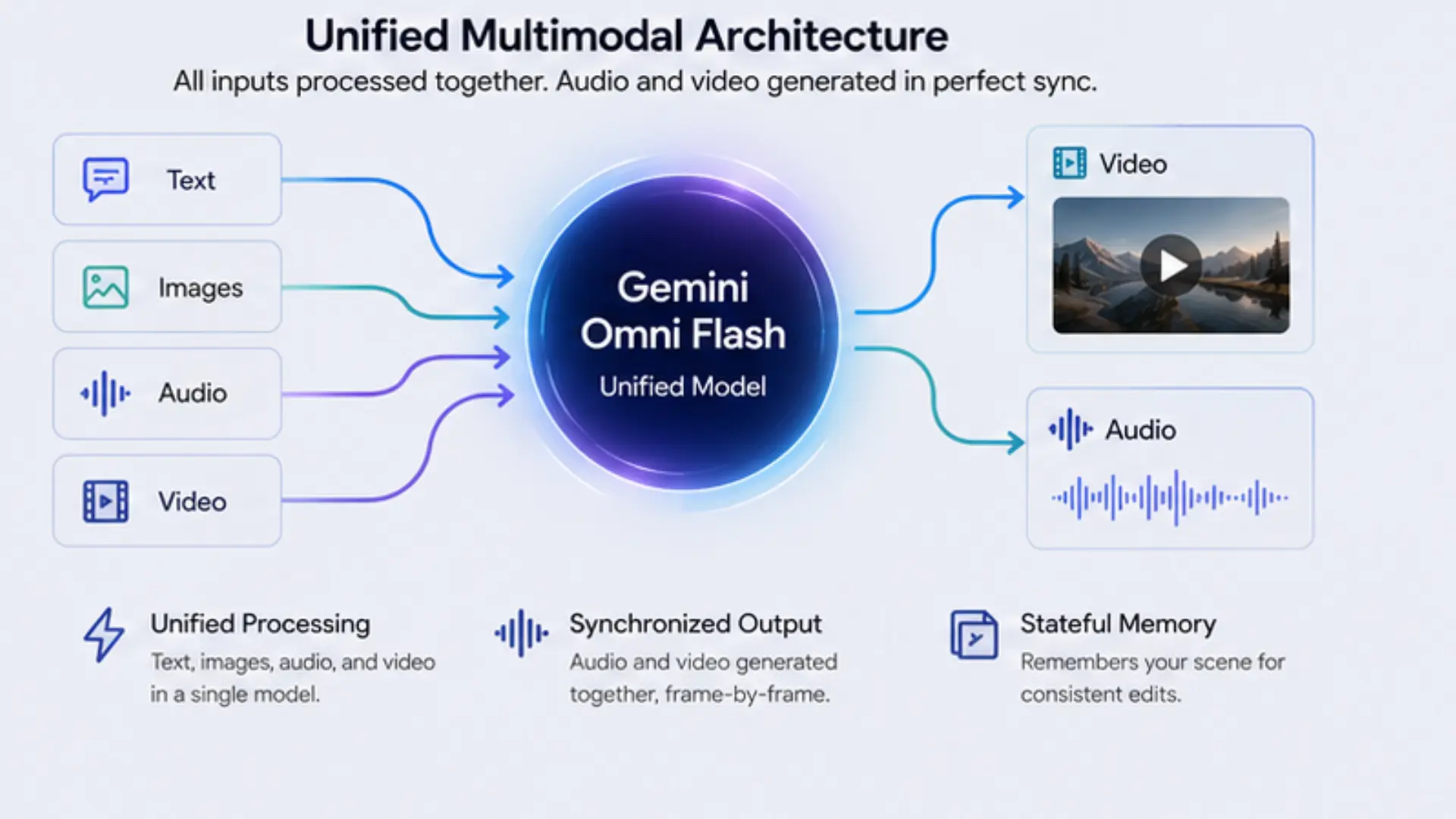
Older AI video models used a split design. To make a video with sound, companies chained together a text model, an image model, a video model, and an audio model. This took up too much memory, ran slowly, and often caused the audio to fall out of sync with the video.
Multimodal Architecture
Gemini Omni Flash drops this split design. It uses one shared space for all inputs. First, it processes all media types at the same time. It does not turn videos into text descriptions first. Because all inputs share the same neural pathways, the model understands complex instructions easily. For example, it can match the speed of a video to the beat of an audio file.
Second, it generates audio and video at the exact same time. If a glass breaks on screen, the sound matches the exact millisecond of the crash.
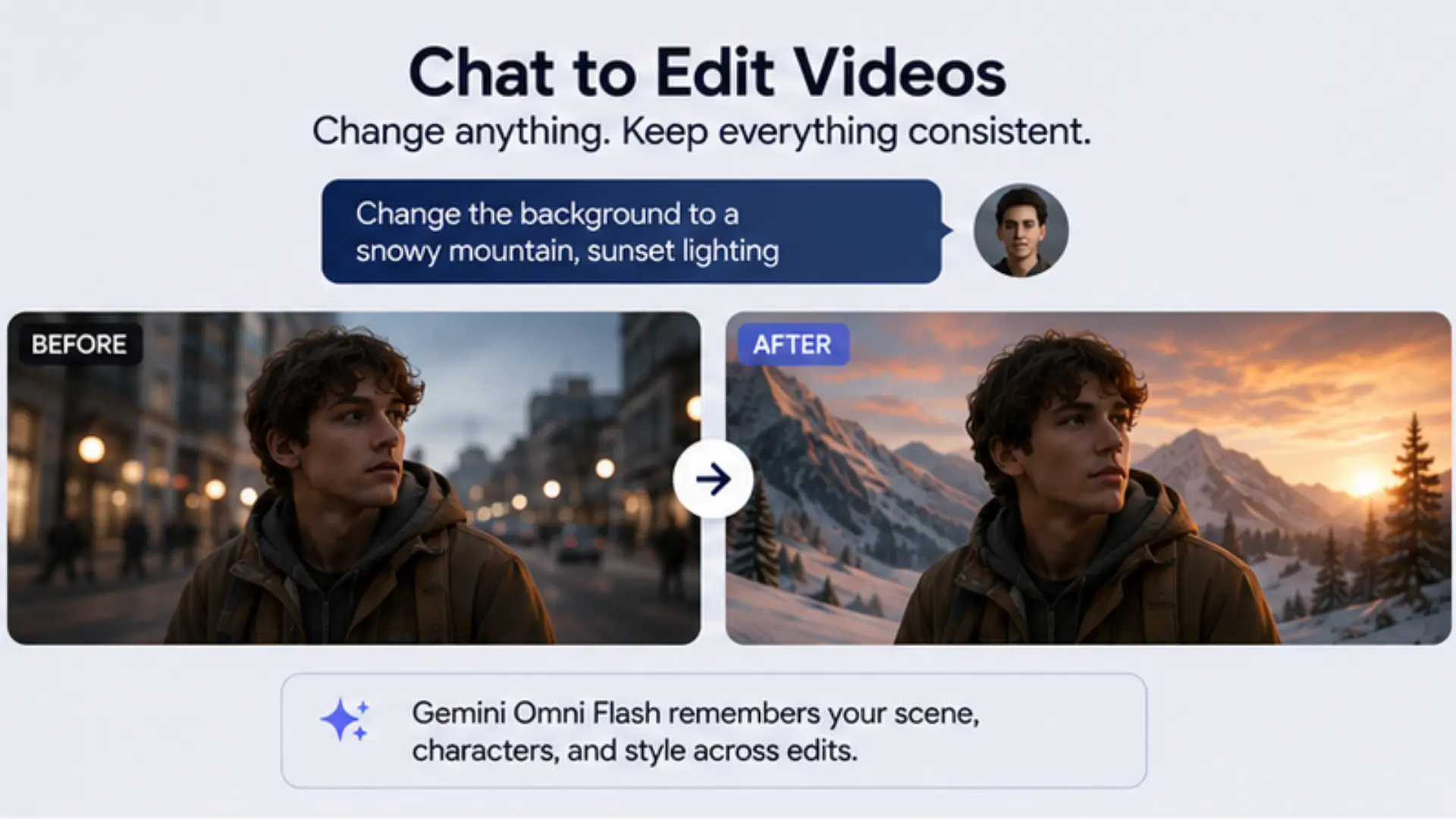
Third, it has a stateful memory. It remembers the scene it just made. You can ask it to change the background, and it will keep the main subject exactly the same.
Benchmark Results and Empirical Evaluation
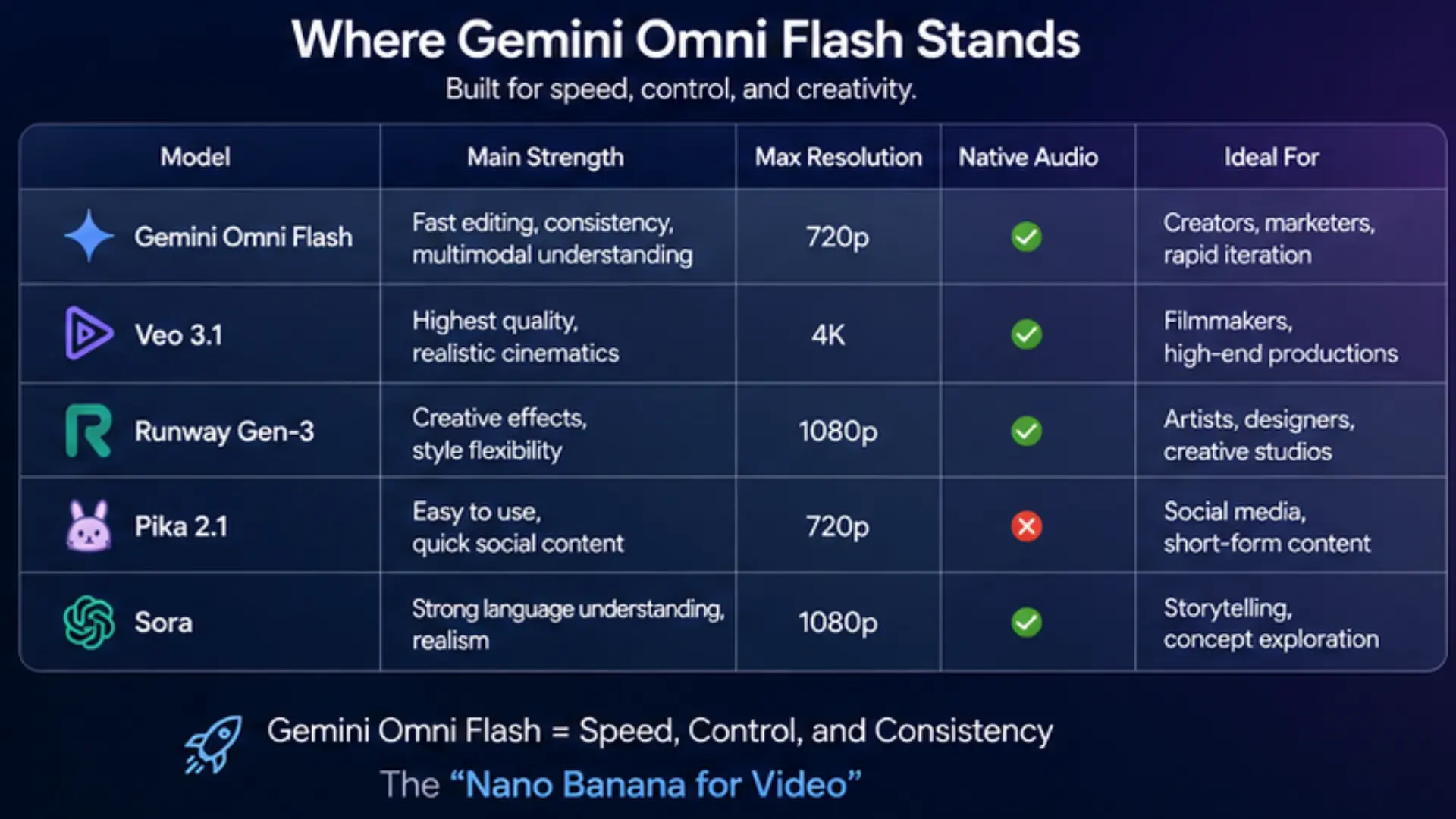
Google focused on showing off what the model can do rather than sharing standard test scores. However, independent tests show where Gemini Omni Flash stands. It trades maximum video quality for better editing, smart reasoning, and fast speeds.
Comparative Video Generation Landscape
| Model | Main Strength | Weakness | Max Resolution | Native Audio | Evaluation |
| Gemini Omni Flash | Chat editing, mixed inputs | Complex physics, non-Latin text | 720p at 24fps | Yes | High workflow speed |
| Seedance 2.0 | Realistic human motion | Poor chat editing | 1080p | Yes | 1,269 Elo score |
| Veo 3.1 | Cinematic 4K quality | Slow, needs full restarts for edits | 4K | Yes | Top cinematic quality |
| Kling VIDEO O3 | Long stories | Limited physics and editing | 4K | Yes | Good for long videos |
Empirical Evaluation Insights
Independent tests show the model's true limits. The model keeps the scene perfect for up to four chat edits in a row. You can change clothes, lighting, and objects without breaking the video. After four edits, small details start to drift. Still, this beats other models that break on the second try.
The model understands gravity and weight well for single objects. However, it struggles with complex physics, like two items crashing at high speed. It also struggles to write non-Latin letters, like Japanese characters, correctly on screen.
Finally, the model's audio is good for social media. Sounds happen within 200 milliseconds of the action, but it is not perfect enough for pro music videos.
Model Comparisons
Capabilities at a Glance
Gemini Omni Flash replaces many video tools with one simple chat box. You can edit videos step-by-step. Just tell the model to "make the violin invisible" or "change the sky to sunset". The model finds the object and changes it while keeping the rest of the video smooth.
You can also swap items or backgrounds. The model understands lighting and depth, so new items fit perfectly into the scene. This is great for changing a product's color without filming again.
The model can also turn simple sketches into real-looking videos. The sketch guides the motion, but it disappears from the final video to look clean.
You can also make AI avatars. Give the model a photo and a voice clip, and it will make the person speak naturally. Lastly, the model can watch long videos and summarize them or find the best 30-second clips for you.
How to Run Gemini Omni Flash via the Interactions API
You cannot run Gemini Omni Flash on your home computer. You must use Google's cloud API. Google made the Interactions API specifically for this chat-based editing. First, install the SDK and get an API key.
Bash
  pip install google-genai
export GEMINI_API_KEY="your-api-key-here"
Text-to-Video Generation
You can make a video from text using the interactions.create method. Give the model clear details about lighting and camera moves. You can also choose the video shape, like 16:9 for landscape.
Python
  import base64
import os
from google import genai

client = genai.Client(api_key=os.environ.get("GEMINI_API_KEY"))

interaction = client.interactions.create(
    model="gemini-omni-flash-preview",
    input="A futuristic city with flying cars, continuous drone shot.",
    response_format={"type": "video", "aspect_ratio": "16:9"}
)

with open("city.mp4", "wb") as f:
    f.write(base64.b64decode(interaction.output_video.data))
Image-to-Video and Multimodal Input Integration
You can send pictures and text at the same time. This helps animate product photos.
Python
  interaction = client.interactions.create(
    model="gemini-omni-flash-preview",
    input=[
        {"type": "image", "data": base64_image, "mime_type": "image/jpeg"},
        {"type": "text", "text": "Turn this into realistic footage."}
    ],
    generation_config={"video_config": {"task": "image_to_video"}}
)

with open("animated.mp4", "wb") as f:
    f.write(base64.b64decode(interaction.output_video.data))
Note: You must upload user videos through the Google File API first instead of sending raw base64 data.
Stateful Video Editing
You can edit a video without starting over. Just pass the previous interaction id to the API.
Python
  first_turn = client.interactions.create(
    model="gemini-omni-flash-preview",
    input="A woman in a red dress playing violin."
)

second_turn = client.interactions.create(
    model="gemini-omni-flash-preview",
    previous_interaction_id=first_turn.id,
    input="Make the violin invisible."
)

with open("edited.mp4", "wb") as f:
    f.write(base64.b64decode(second_turn.output_video.data))
Chat-Based Editing
Deployment, Tooling, and Integration Options
Google put this model in many places. Developers can use Google AI Studio and the Gemini Enterprise Platform. You can also use the Antigravity CLI and MCP servers to build automated AI agents. These tools let agents make and edit videos right inside a code editor.
Normal users can use OpenArt to jump between Omni Flash and Veo 3.1. Google also put it in the Gemini app, Google Flow, and YouTube Shorts so anyone can use it without writing code.
Iterative Refinement and Workflow Economics
You do not fine-tune this model by downloading its weights. Instead, you "tune" it by chatting and changing the video step-by-step. You must watch your API costs.
Token Constraints and API Limitations
| Rule | Limit | Impact |
| Max Input | 131,072 tokens | Good for lots of text and photos. |
| Max Output | 57,920 tokens | Equals exactly 10 seconds of video. |
| Speed Cost | 5,792 tokens per second | Used to price 720p 24fps videos. |
| Time Limit | 10 seconds | Great for short ads, bad for movies. |
| Location Rule | Europe and UK users | Cannot edit their own uploaded videos right now. |
The Economics of Video Generation
The Gemini API bills you for reading inputs and making videos. Text and image inputs cost $1.50 per 1 million tokens. Making the video costs $0.10 per second.
A 10-second clip costs $1.00. This matches the cheap Veo 3.1 Fast model. It is much cheaper than standard Veo 3.1, which costs $0.40 per second for 4K video.
Optimized Workflow: Chaining Models
Smart developers chain models to save money. First, they use the Nano Banana 2 Lite model to make a cheap test image for $0.000034. Next, they feed that perfect image into Omni Flash to animate it. A 5-second video costs just $0.50. This cheap setup is perfect for making fast social media ads.
Conclusion
Gemini Omni Flash changes how we make videos. Google built a single model that understands text, images, and audio at the same time. You can now edit videos by talking to the AI. It understands physics and makes perfect sounds in one step.
It only makes 720p video for up to 10 seconds right now. But at just $0.10 per second, it is perfect for fast, cheap video editing. When you pair it with fast image models, it makes video creation feel like a simple chat.
What is Gemini Omni Flash and how does it work?
Gemini Omni Flash is Google's natively multimodal AI model designed to process text, images, video, and audio simultaneously. Instead of relying on separate, cascaded models for different tasks, it uses a unified architecture to generate cohesive video with perfectly synchronized audio in a single inference pass.
Can I make changes to a generated video without starting over?
Yes, one of the primary features of Gemini Omni Flash is stateful, conversational video editing. Through the Interactions API, you can retain the memory of a generated scene and use natural language to swap elements, change lighting, or restyle the clip while keeping the rest of the video perfectly intact.
How much does Gemini Omni Flash cost to use?
Video generation with Gemini Omni Flash is priced at roughly $0.10 per second of 720p output, which translates to $17.50 per 1 million output tokens. This competitive pricing makes it highly cost-effective for developers who want to chain multiple models together for high-volume creative workflows.

Simplify Your Data Annotation Workflow With Proven Strategies
.png)