Benchmarking SAM and SAM 3 on Aerial Data
Compare SAM and SAM 3 for aerial image segmentation. See zero-shot benchmark results across satellite datasets, performance differences, and how to use both models inside Labellerr for faster geospatial annotation workflows.

What Is SAM?
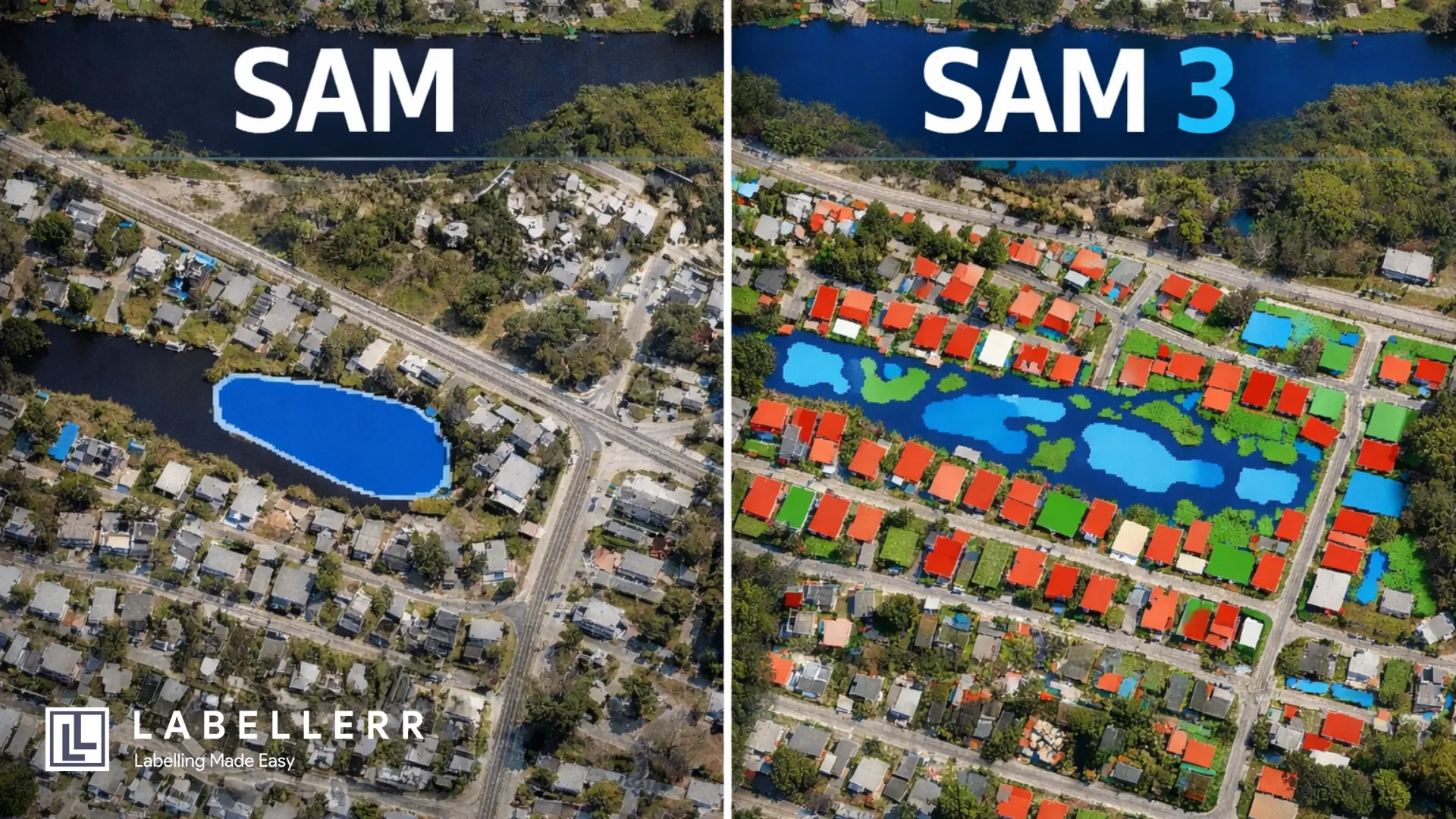
SAM (Segment Anything Model) is Meta's segmentation model that generates pixel-level masks from simple prompts. These prompts can be a point or a box. No task-specific training needed.
What Is SAM 3?
SAM 3 takes it further with open-vocabulary segmentation. You pass a text prompt like "building" or "water." The model then detects and segments all matching objects across the image in one inference pass.
Aerial Datasets
Aerial datasets are collections of images captured from satellites, drones, or aircraft, used to train and evaluate segmentation models. They cover real-world tasks like building detection, road mapping, and flood segmentation.
Compared to regular images, they are significantly harder to segment due to top-down perspective, small and densely packed objects, and complex terrain.
Benchmark Results on Aerial Datasets with SAM
The table below shows how SAM performed across different aerial and satellite datasets in zero-shot mode. Source: SegEarth-OV3, arXiv:2512.08730
| Dataset | Task | # Files | IoU | Dataset Source |
|---|---|---|---|---|
| WBS-SI | Flood / Water Body | ~1,000+ | 39.8% | Kaggle – Water Body Segmentation |
| WHU Aerial | Building | ~8,189 | 29.8% | Ji et al., IEEE TGRS 2018 |
| Inria | Building | ~360 | 33.4% | Maggiori et al., IGARSS 2017 |
| DeepGlobe | Road | ~6,226 | 13.2% | Demir et al., CVPR Workshops 2018 |
| UAVid | Semantic Seg. | ~300 | 28.6% mIoU | Kaggle UAVid Dataset |
| iSAID | Instance Seg. | ~2,806 | 14.5% mIoU | Zamir et al., CVPR Workshops 2019 |
mIoU(Mean Intersection over Union)
Benchmark Results on Aerial Datasets with SAM 3
SAM 3 results below are all zero-shot. SAM 3 consistently outperforms SAM across every task. Source: SegEarth-OV3, arXiv:2512.08730
| Dataset | Task | # Files | IoU | Dataset Source |
|---|---|---|---|---|
| WBS-SI | Flood / Water Body | ~1,000+ | 75.6% | Kaggle – Water Body Segmentation |
| WHU Aerial | Building | ~8,189 | 86.9% | Ji et al., IEEE TGRS 2018 |
| Inria | Building | ~360 | 72.4% | Maggiori et al., IGARSS 2017 |
| DeepGlobe | Road | ~6,226 | 39.3% | Demir et al., CVPR Workshops 2018 |
| UAVid | Semantic Seg. | ~300 | 54.7% mIoU | Kaggle UAVid Dataset |
| iSAID | Instance Seg. | ~2,806 | 27.6% mIoU | Zamir et al., CVPR Workshops 2019 |
SAM vs. SAM 3 Quick Comparison
SAM: Strengths
- Generates accurate pixel-level masks with box or click prompts on high-resolution aerial imagery.
- On high contrastive images, the segmented masks have clear boundaries.
SAM: Limitations
- Requires a separate prompt for every individual object inefficient at scale across large datasets.
- Performance drops significantly on low-resolution satellite images, dense urban scenes, or objects with weak visual boundaries, and smaller objects.
SAM 3: Strengths
- A single text or box prompt segments all matching objects across the entire image.
- Compared to SAM, SAM 3 produces fewer fragmented or overlapping masks when multiple objects appear close together.
SAM 3: Limitations
- Limited performance on small or low-contrast targets, which are common in satellite imagery, where blurred boundaries can lead to missed or incomplete detections.
- Difficulty separating closely packed instances, such as dense urban buildings, where adjacent objects may be merged into a single segmentation mask.
Using SAM & SAM 3 in Labellerr
Here's what the annotation workflow looks like in Labellerr using SAM and SAM 3:
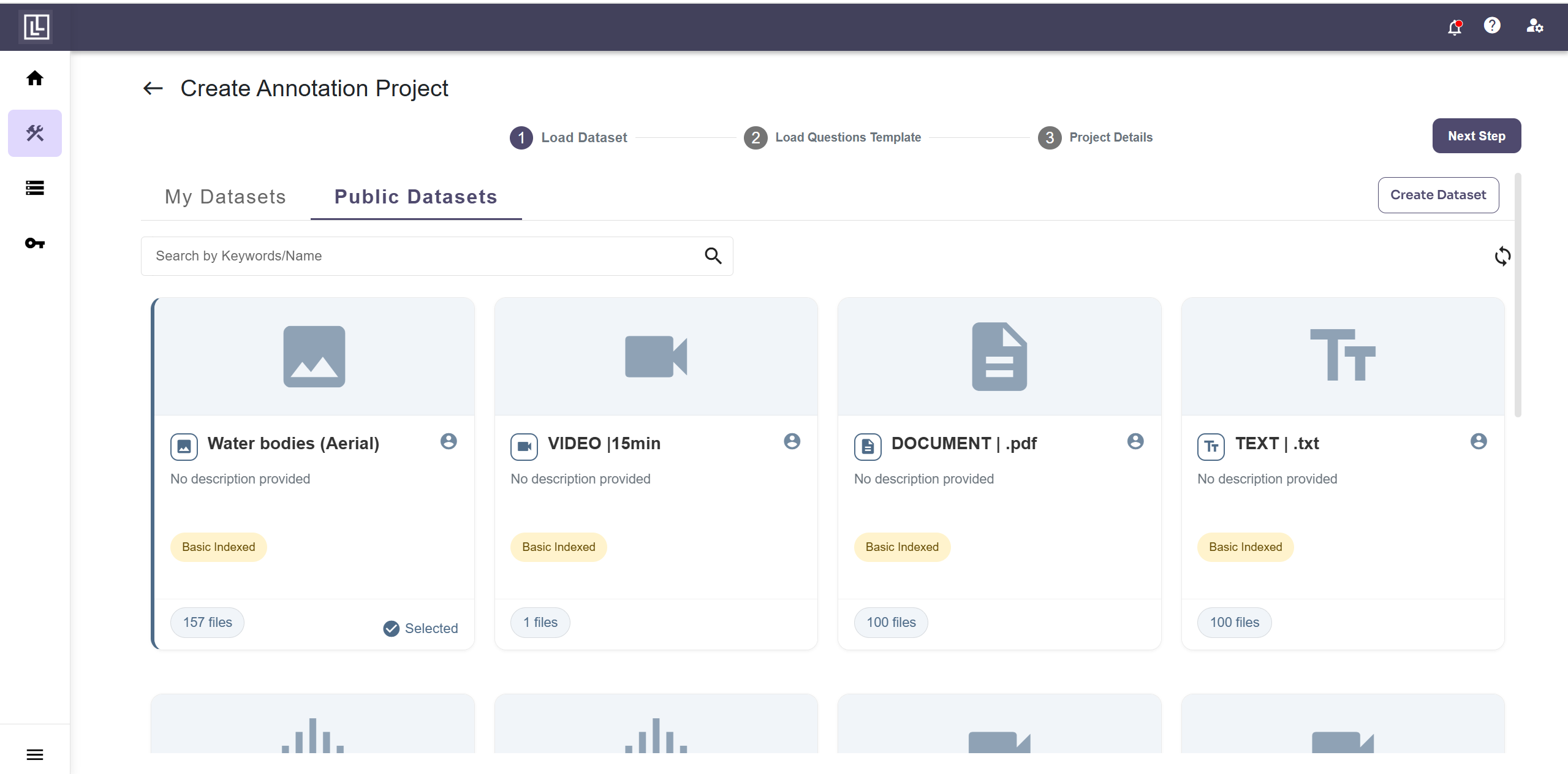
Step 1: Upload Your Dataset or use Public Datasets
Labellerr offers public datasets you can use directly, for this demo, select the “Water bodies” dataset from Labellerr's public datasets. No upload needed.
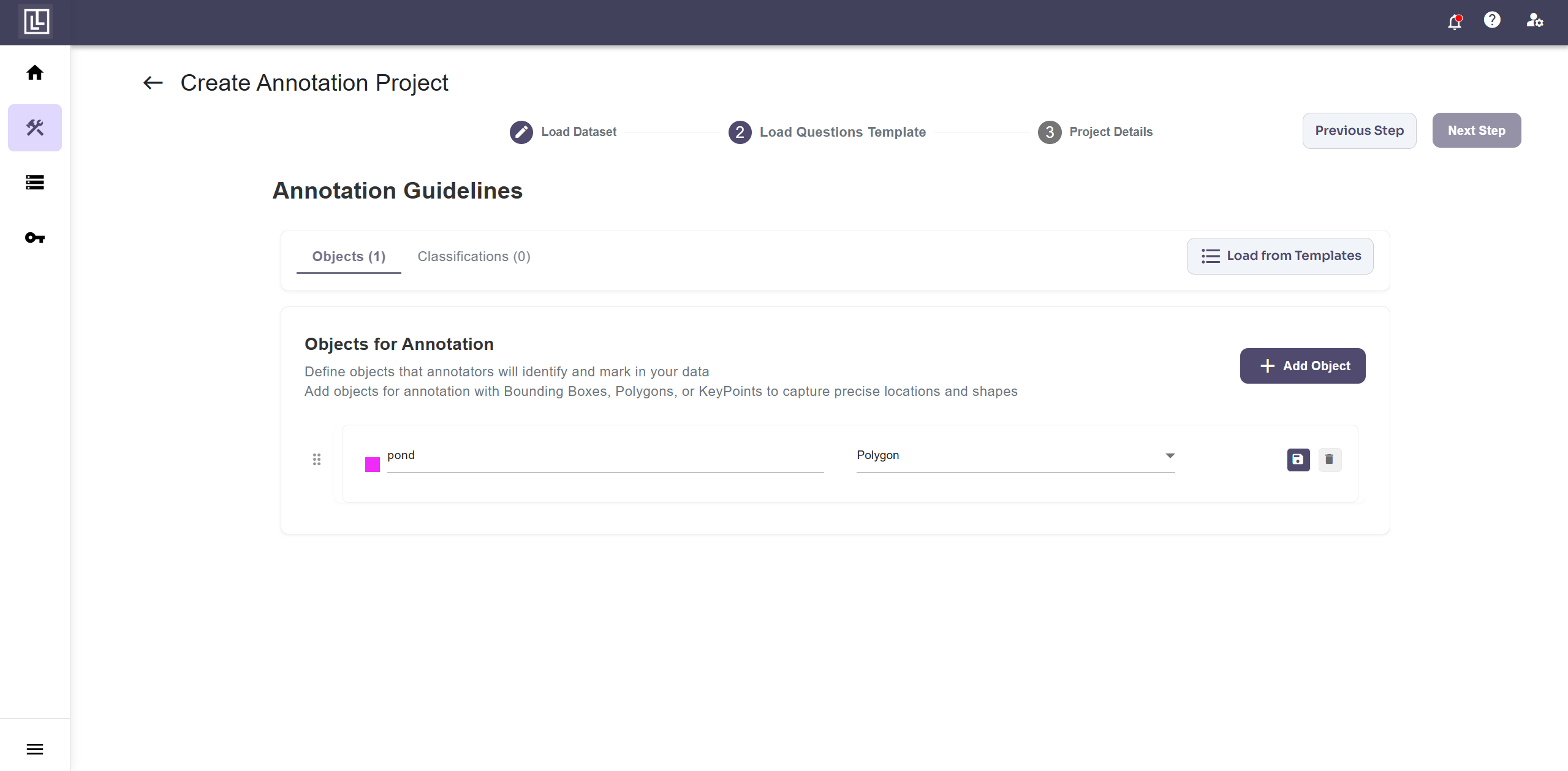
Step 2: Build the Annotation Template
Once the dataset is loaded, create a new annotation template. Set the label class to Pond and the annotation type to Polygon.
Step 3: Annotate with SAM (One Click per Object)
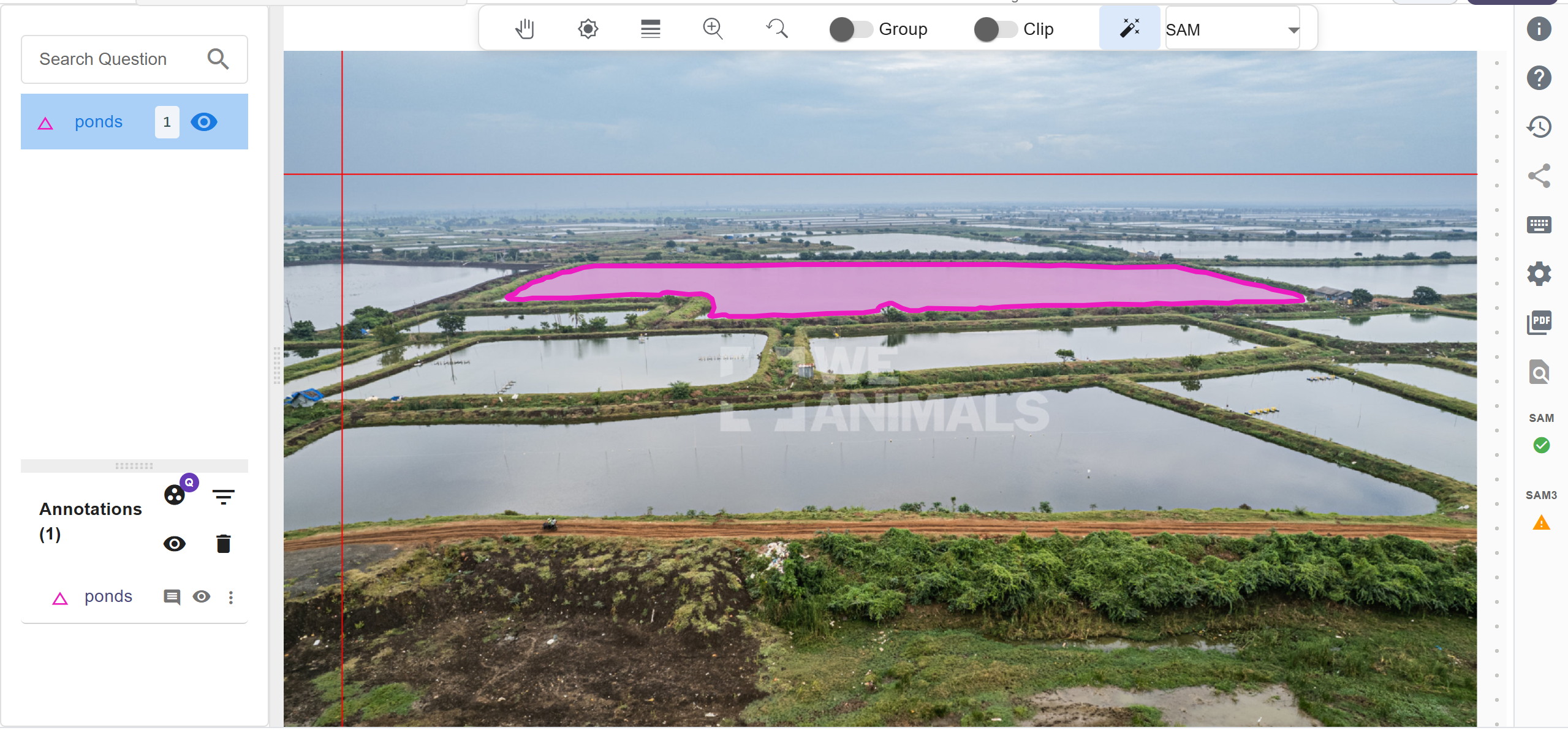
Enable SAM in Labellerr and click once on a water body the model instantly generates a segmentation mask around it. If your image contains multiple object types (water, land, vegetation), you need to click on each object individually to annotate them one-by-one.
Step 4: Annotate with SAM 3 (One Click for the Whole Image)
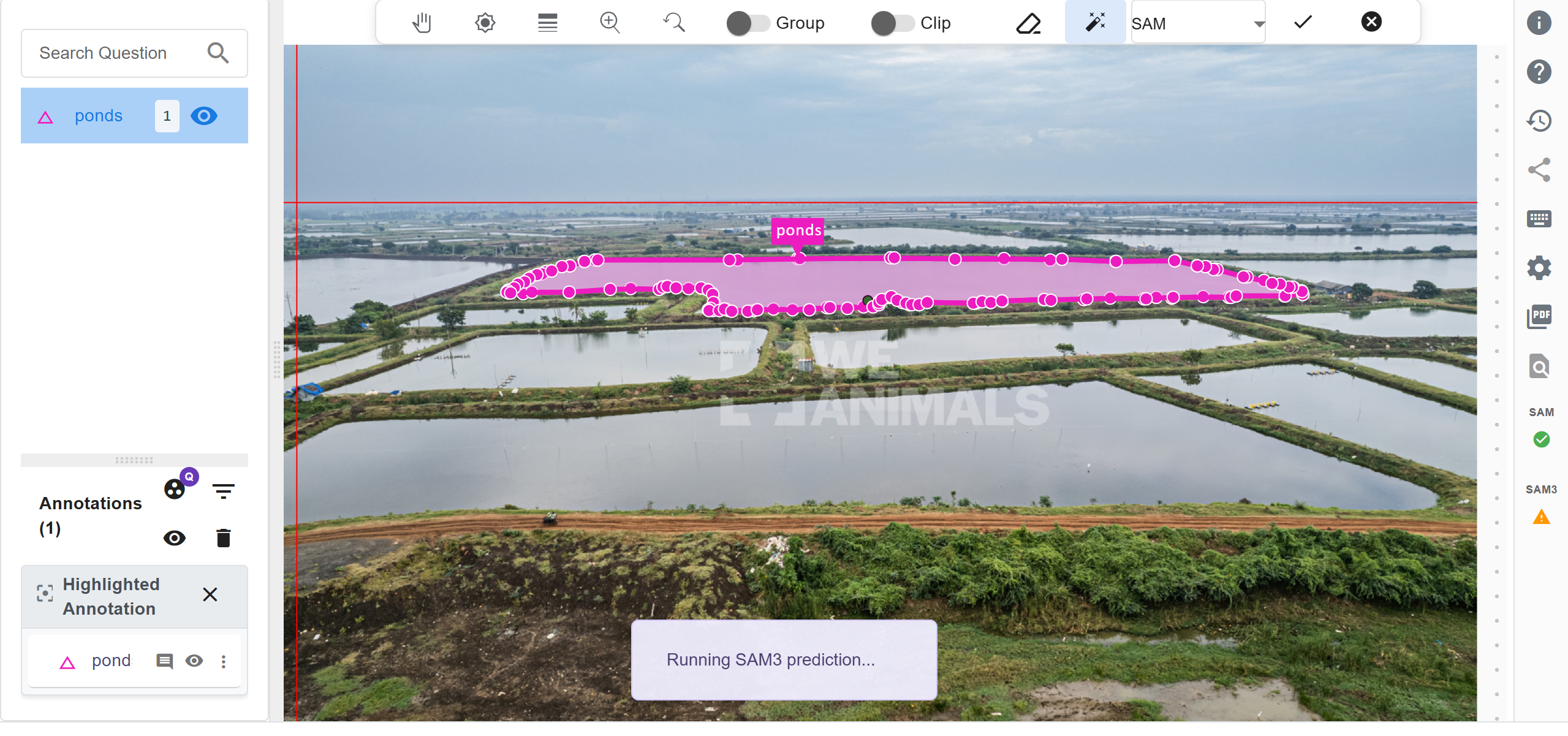
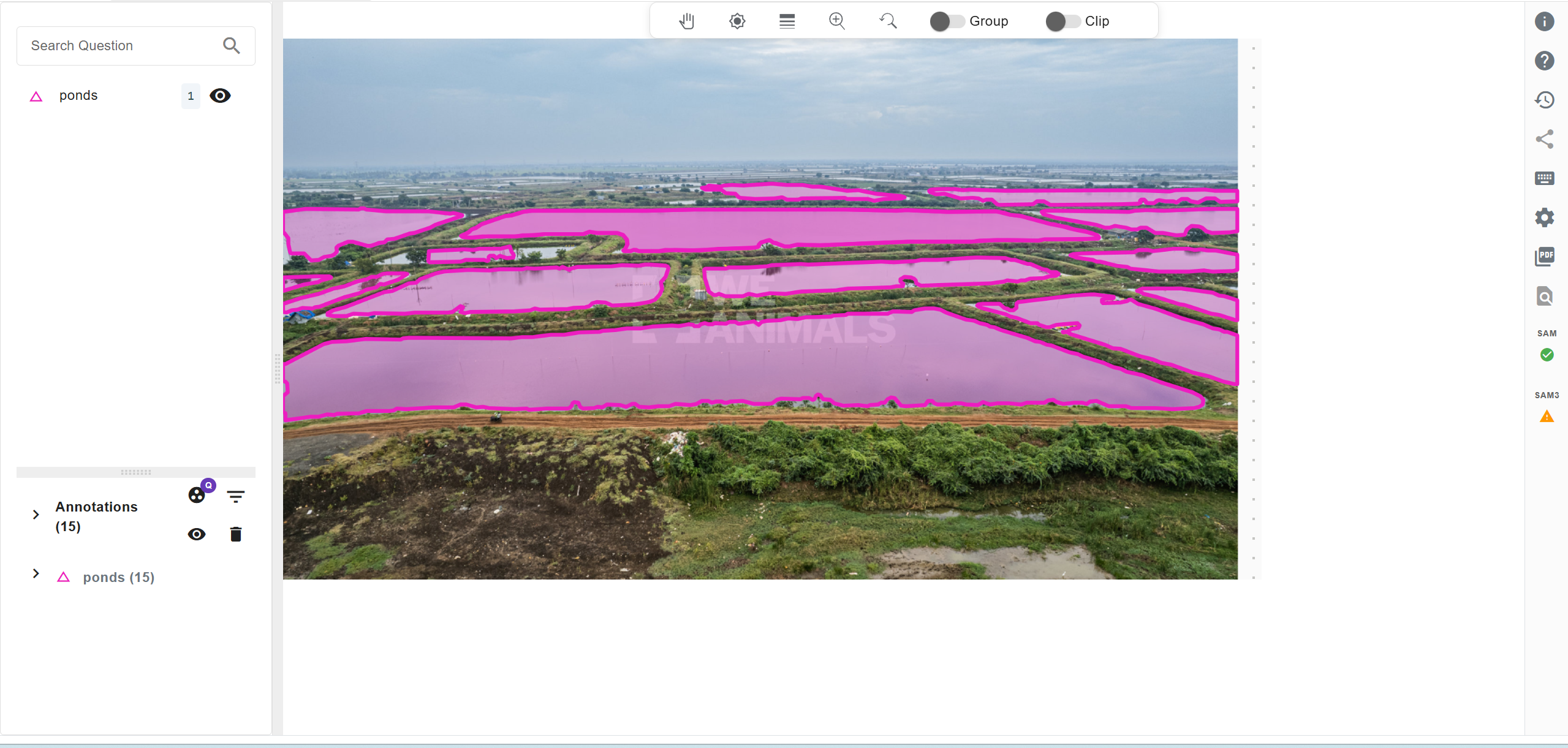
Switch to SAM 3 in Labellerr, click once on any object, and press I to run the prediction. SAM 3 automatically detects and segments all similar objects across the entire image in one go. This avoids the need to click on each object individually to annotate them one-by-one.
Final output
Watch the Full Demo
See SAM and SAM 3 side by side in Labellerr:
Why Use Labellerr for This?
- Switch between SAM and SAM 3 without leaving the platform.
- Export annotations as COCO JSON, JSON, and more.
- Team collaboration with role-based access and review workflows.
- Built-in quality checks to validate your segmentation masks.
In cases where zero-shot models fall short, our human-in-the-loop support can be leveraged to consistently reach >99% accuracy.
FAQs
Q1: What is the main difference between SAM and SAM 3?
SAM requires manual prompts like clicks or bounding boxes for each object, while SAM 3 supports open-vocabulary segmentation using a text prompt to segment all matching objects in a single inference pass.
Q2: Why is segmentation harder on aerial and satellite imagery?
Aerial imagery includes small, densely packed objects, top-down perspectives, and complex terrain, making object boundaries harder to distinguish compared to natural images.
Q3: Is SAM 3 better than SAM for zero-shot geospatial segmentation?
Yes. According to SegEarth-OV3 , SAM 3 significantly improves mean IoU across multiple remote sensing benchmarks without retraining.

Simplify Your Data Annotation Workflow With Proven Strategies
.png)