Building a Real-Time Schematic ADAS with YOLO11x
Learn how to build a 4K vision-based ADAS using YOLO11. This guide explains how to track lanes in real time and provide instant safety alerts to help drivers stay in their lanes.
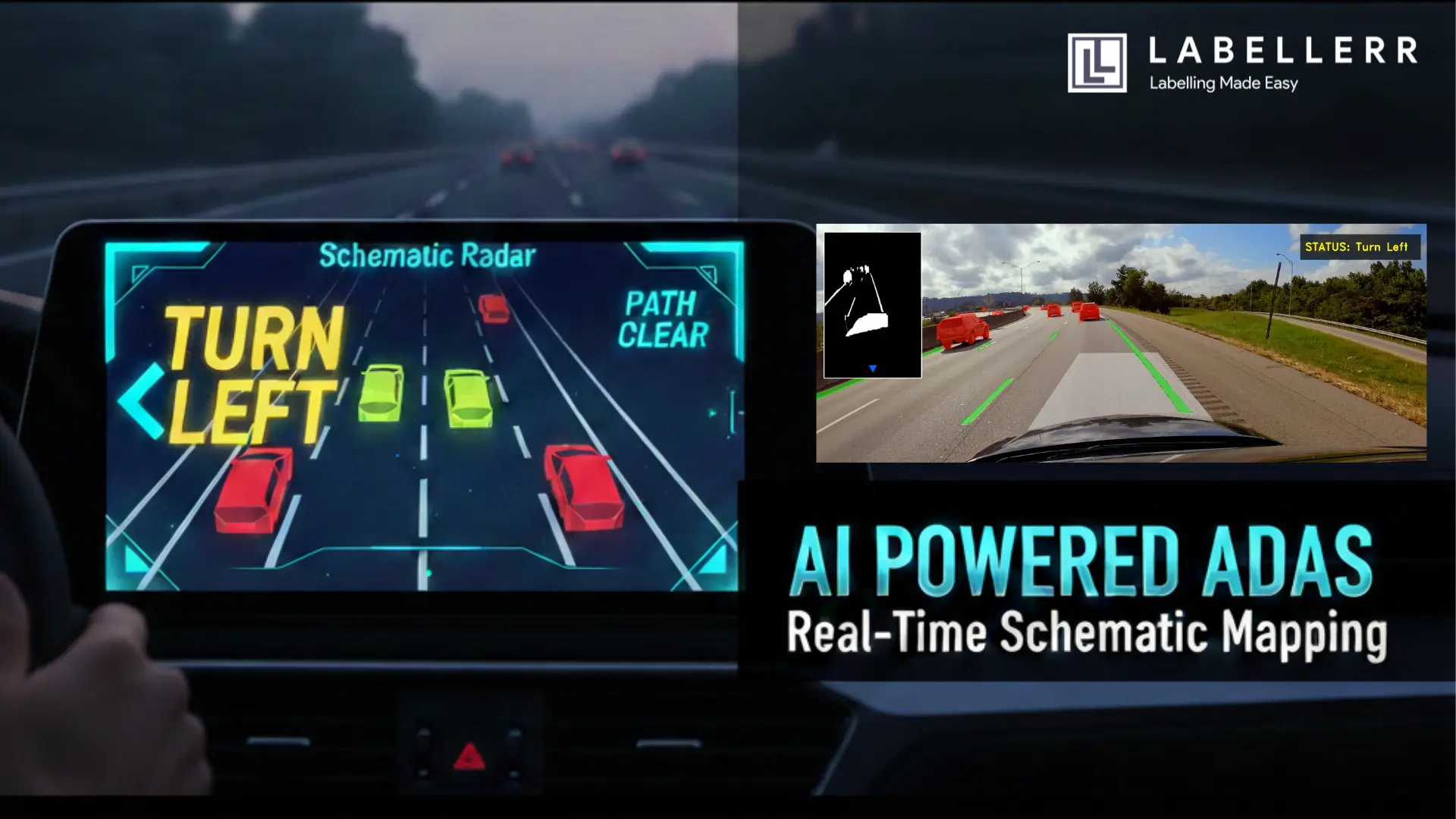
The automotive industry is shifting from mechanical machines to "Software Defined Vehicles." At the heart of this change is ADAS (Advanced Driver-Assistance Systems). While big names like Tesla dominate the news, the technology behind them Computer Vision is now accessible to all developers.
In this guide, we’ll explore how to build an Advanced Vision-Based ADAS. This system doesn't just detect cars; it maps them into a real-time digital schematic to help drivers navigate safely.
What Exactly is ADAS?
Before we dive into the Python code and GPU benchmarks, let’s define the goal. ADAS is not "Self-Driving." Instead, it is a suite of technologies designed to act as a co-pilot. Its primary mission is to increase road safety by minimizing human error.
Most ADAS features fall into two categories:
- Passive Alerts: Systems that warn the driver (e.g., Lane Departure Warning).
- Active Assistance: Systems that take control (e.g., Emergency Braking).
.webp)
ADAS
Our project focuses on the Perception and Logic layers. We want a system that can see the road, identify lane boundaries, and provide clear directional guidance when the vehicle begins to drift.
The Perception Engine: Why YOLO11?
For any ADAS to work, it needs "eyes." Historically, developers used simple edge detection (like Canny) to find lane lines. However, edge detection fails in the rain, at night, or when the road is cluttered with shadows.
To solve this, I chose YOLO11x (Extra Large) instance segmentation.
Instance Segmentation vs. Object Detection
Standard object detection draws a box around a car. Instance segmentation, however, colors every single pixel belonging to that car. For an ADAS, this is critical. If we only have a box, we don't know the exact boundary of the vehicle or the precise curvature of the lane line. With segmentation, we get a pixel-perfect mask.
By training on high-performance cloud GPUs, we achieved a model capable of distinguishing between:
- Leading vehicles (Cars).
- Lane infrastructure (White and Yellow lines).
- Heavy transport (Trucks).
Solving the Spatial Problem: Perspective Mapping
A camera sees the world in 2D, but the road exists in 3D. Because of perspective distortion (parallel lane lines appear to meet at a vanishing point on the horizon). This makes it very difficult for an AI to judge distance or drift.
Instead of treating the whole frame as the "road," we define a specific Region of Interest (ROI). Using a custom OpenCV script, I mapped an 8-point polygon that follows the natural trapezoidal shape of the lane. This polygon acts as a digital "safety bubble."
The Math of the Sensor Zone
We check if any lane-line pixels enter this bubble. If a line pixel is detected inside, the car is drifting. The system then looks at whether the line is on the left or right side of the bubble’s center. If it's on the left, it triggers a "Turn Right" alert; if it's on the right, it says "Turn Left."
The Innovation: Real-Time Schematic HUD
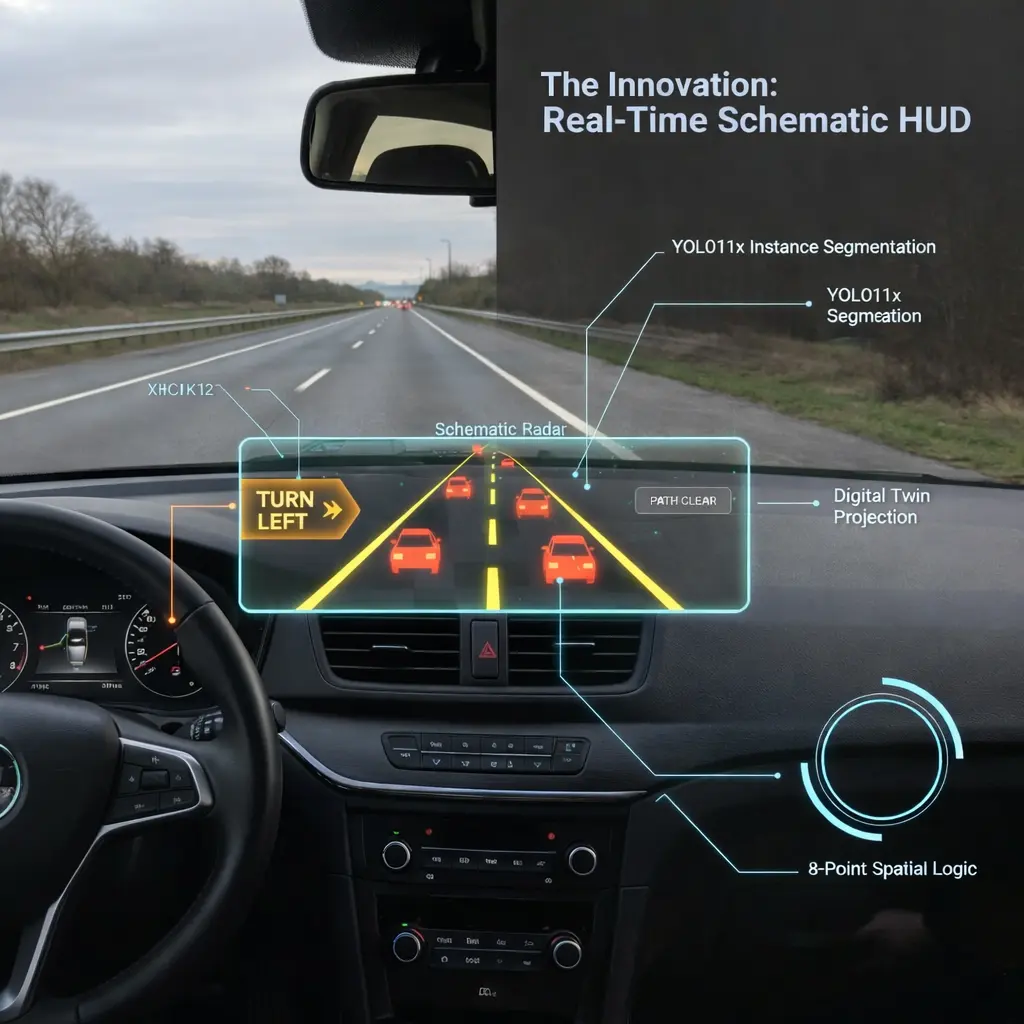
Modern car screens often show too much information, which can distract the driver. To fix this, we created a Schematic HUD (Heads Up Display).
Instead of showing a messy video with boxes everywhere, our system cleans up the view. We dim the background video and make the important data like lane lines and nearby cars glow brightly. This approach helps the driver see only the safety alerts that actually matter without any extra clutter.
Schematic HUD
- The Background: The original world is dimmed.
- The Masks: High-contrast green and red overlays highlight lanes and cars.
- The Radar: A simplified top-down view shows the vehicle's position.
This "Radar" view allows the driver to understand the AI's perception at a single glance. If the system says "Turn Right," the driver can immediately see the orange warning on the HUD and the encroaching lane line on the schematic.
Technical Challenges and Breakthroughs
During development, we hit a major hurdle: Noise.
Every crack in the road or shadow from a tree can look like a lane line to a sensitive AI. To fix this, we implemented a Confidence Threshold of 0.15 and a Centroid Logic for the signals.
Rather than reacting to every single pixel, the system looks for a "cluster" of detections. Only when a significant portion of a lane mask enters our safety perimeter does the status change from "Path Clear" to a directional warning. This prevents the "jittery" HUD experience found in many early-stage vision projects.
The Future: Where Does This Go?
The "Advanced Vision-Based ADAS" we built is a foundation. While it currently runs on recorded footage, the logic is ready for real-time integration.
Smart City Integration
Imagine this logic applied to static city cameras. Instead of a car seeing the road, the city sees the cars. The schematic mapping could tell a central traffic hub exactly where congestion is forming or where a vehicle has broken down, long before a human reports it.
Blind Spot Expansion
By adding three more cameras, this 8-point polygon logic can be expanded into a 360-degree safety bubble. The schematic HUD would then show a complete top-down "God-view" of the vehicle, marking threats from the rear and sides in real-time.
Conclusion
Building ADAS taught me that the hardest part of AI isn't the model it's the spatial reasoning. Anyone can run a YOLO model, but turning those detections into a "Turn Left" command requires a deep understanding of geometry and user interface design.
By combining YOLO11x segmentation with a custom schematic HUD, we’ve created a system that doesn't just see it assists. As hardware becomes more powerful and models become more efficient, the line between a human driver and an AI co-pilot will continue to blur, making our roads safer for everyone.
FAQs
How does YOLO11 differ from previous versions for ADAS applications?
YOLO11 offers significant improvements in architectural efficiency and accuracy. For ADAS, the primary benefit is the enhanced instance segmentation capability, which allows the system to define the exact edges of lanes and vehicles rather than just drawing bounding boxes. This precision is vital for spatial logic and calculating the vehicle’s exact position on the road.
Can this system run in real-time on standard vehicle hardware?
While the current implementation uses high-performance GPUs (like NVIDIA T4) for 4K video processing, the model can be optimized for edge devices using TensorRT or OpenVINO. By reducing the input resolution or using a smaller model variant (like YOLO11n-seg), real-time performance can be achieved on embedded automotive hardware.
Why is Schematic Mapping better than a standard camera view?
Schematic Mapping reduces the "cognitive load" on the driver. A standard camera view is filled with visual noise like buildings and shadows. The schematic HUD filters this out, providing a high-contrast "Digital Twin" of the environment that highlights only the critical safety data, making alerts like "Turn Right" much easier to process instantly.

Simplify Your Data Annotation Workflow With Proven Strategies
.png)