
Best Open-Source Model Comparison
A detailed comparison of leading open-source text-to-image models—Qwen-Image, HiDream-I1, FLUX.2, and Stable Diffusion 3 Medium—covering architecture, performance, hardware requirements, and ideal use cases.

The field of generative AI is increasingly defined by a tension between powerful but proprietary closed-source systems and their open-source counterparts. While closed models often deliver impressive demonstrations, open-source text-to-image models represent a strategic alternative, offering users unparalleled control over the model, the pipeline, and the final output.
This accessibility empowers developers, researchers, and enterprises to fine-tune models for specific needs, ensure data security, and build innovative applications without the limitations of a closed ecosystem.
The challenge lies in navigating the open-source landscape to find the right balance of performance, control, and resource requirements.
In this blog, we compare of four leading open-source models that have recently emerged as significant players: Alibaba's Qwen-Image, HiDream.ai's HiDream-I1, Black Forest Labs' FLUX.2, and Stability AI's Stable Diffusion 3 Medium.
Model Overviews and Technical Specifications
A model's performance in generating coherent and high-quality images is fundamentally shaped by its underlying architecture, training data, and parameter count.
Understanding these core components is essential for appreciating the distinct capabilities and limitations that differentiate one model from another.
This section will dissect the technical specifications of Qwen-Image, HiDream-I1, FLUX.2, and Stable Diffusion 3 Medium to provide a foundation for the performance evaluations that follow.
Qwen-Image
Released by Alibaba in late 2024, Qwen-Image is a 20-billion-parameter model built on a Multimodal Diffusion Transformer (MMDiT) architecture. It is specifically designed to produce natural-looking images and overcome the "AI plastic look" that has characterized previous generations of models.
Its training was deliberately focused on prompt alignment and layout consistency, positioning it as a reliable tool for production-level tasks where predictability is paramount.
- Primary Focus: Excels at rendering complex text, particularly Chinese characters, and generating photorealistic human faces and natural textures like skin, fur, and water.
- Key Update: The Qwen-Image-2512 version specifically targets and improves upon known weaknesses, such as the "synthetic sheen" on faces and the rendering of fine, high-frequency textures.
- Text Encoder: Requires the
qwen_2.5_vl_7b_fp8_scaled.safetensorstext encoder. - VAE: Utilizes its own dedicated Variational Autoencoder,
qwen_image_vae.safetensors
HiDream-I1
HiDream-I1 is a 17-billion-parameter model released on April 7, 2024, by the startup HiDream.ai. Offered under the permissive MIT license, it is available for personal, research, and commercial use. The model's architecture is engineered for sophisticated prompt understanding and the processing of complex scenes.
- Hybrid Architecture: Uniquely combines a Diffusion Transformer (DiT) with a Mixture of Experts (MoE) framework. This design enhances its ability to process complex scenes and render fine details like color and edges with high fidelity.
- Quad-Encoder Architecture: Integrates four distinct text encoders to achieve State-of-the-Art semantic parsing: OpenCLIP ViT-bigG, OpenAI CLIP ViT-L, T5-XXL, and Llama-3.1-8B-Instruct. This combination provides superior understanding of complex prompts involving colors, quantities, and spatial relationships.
- Model Variants: Offered in three versions to balance quality and speed:
-
Full: Highest quality, requiring 50 inference steps. -
Dev: A distilled version for balanced performance, requiring 28 steps. -
Fast: A highly distilled version for real-time iteration, requiring only 16 steps. -
VAE: Relies on the VAE from the FLUX model (ae.safetensors).
-
FLUX.2
Developed by Black Forest Labs, the original team behind Stable Diffusion, FLUX.2 is engineered specifically for high-end, professional production workflows. It moves beyond simple image generation to offer a suite of precision controls that blur the line between generated and photographed content, making it suitable for demanding enterprise applications.
- High-Resolution Output: Capable of generating images at up to 4-megapixel (4MP) resolution, reducing the need for post-processing and upscaling.
- Advanced Control Systems: Features a multi-reference control system that can use up to 10 images to ensure character and style consistency. It also supports exact color matching via HEX codes and a JSON-based control system for programmatic and repeatable scene definition.
- Typography: Engineered to produce production-ready text suitable for UI mockups, infographics, and complex typography.
- Model Variants: Includes multiple variants tailored to different needs, such as
max(top-tier quality),pro(quality at speed),flex(precision and typography), and an open-weightsdevversion for custom deployment and fine-tuning.
Stable Diffusion 3 Medium
Stable Diffusion 3 Medium (SD3M), released by Stability AI in mid-2024, is a 2-billion-parameter model designed for maximum accessibility and resource efficiency. Its smaller size makes it a highly practical choice for running on standard consumer hardware, democratizing access to high-quality image generation.
- Architecture: Based on a Multimodal Diffusion Transformer (MMDiT), similar to Qwen-Image.
- Accessibility: Its key differentiator is its small 2B parameter size, which gives it a low VRAM footprint, making it ideal for running on consumer PCs and GPUs.
- Text Encoders: Utilizes three text encoders, including the large T5-XXL model. For users with limited resources, the model can be run without the T5 encoder to further reduce its memory requirements.
- Key Strengths: Shows significant improvements over previous Stable Diffusion generations in typography, understanding of complex prompts, and photorealism, particularly in rendering hands and faces.
With these technical foundations established, the analysis will now proceed to a practical evaluation of each model's performance on standardized creative tasks.
Performance Evaluation: A Standardized Comparison
The true measure of a text-to-image model lies in its ability to translate a user's intent into a visually coherent and accurate image. To reveal the nuanced differences in prompt adherence, realism, and contextual reasoning between these models, it is critical to evaluate them using identical prompts in controlled tests. This section presents the results of a series of such tests, designed to assess core capabilities ranging from photorealism to complex character interactions.
Test 1: Photorealism and Scene Cohesion
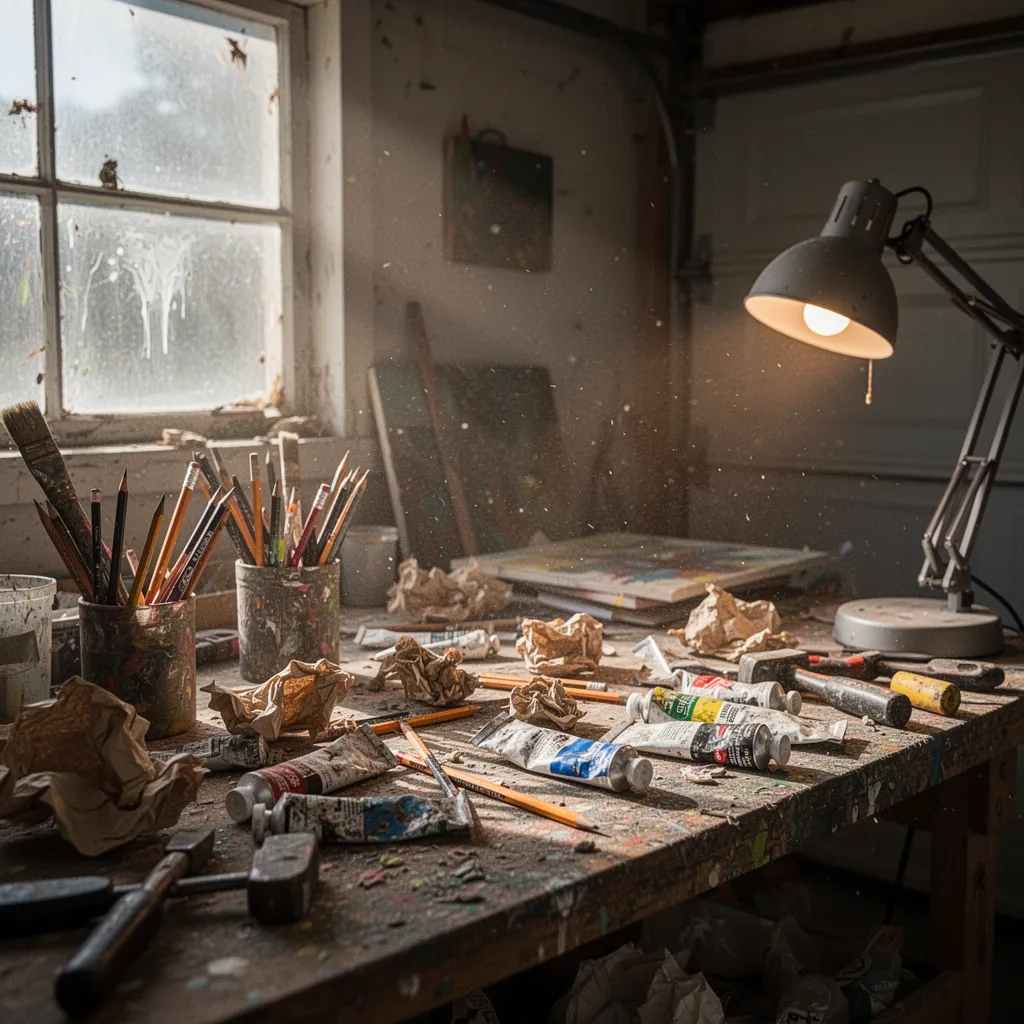
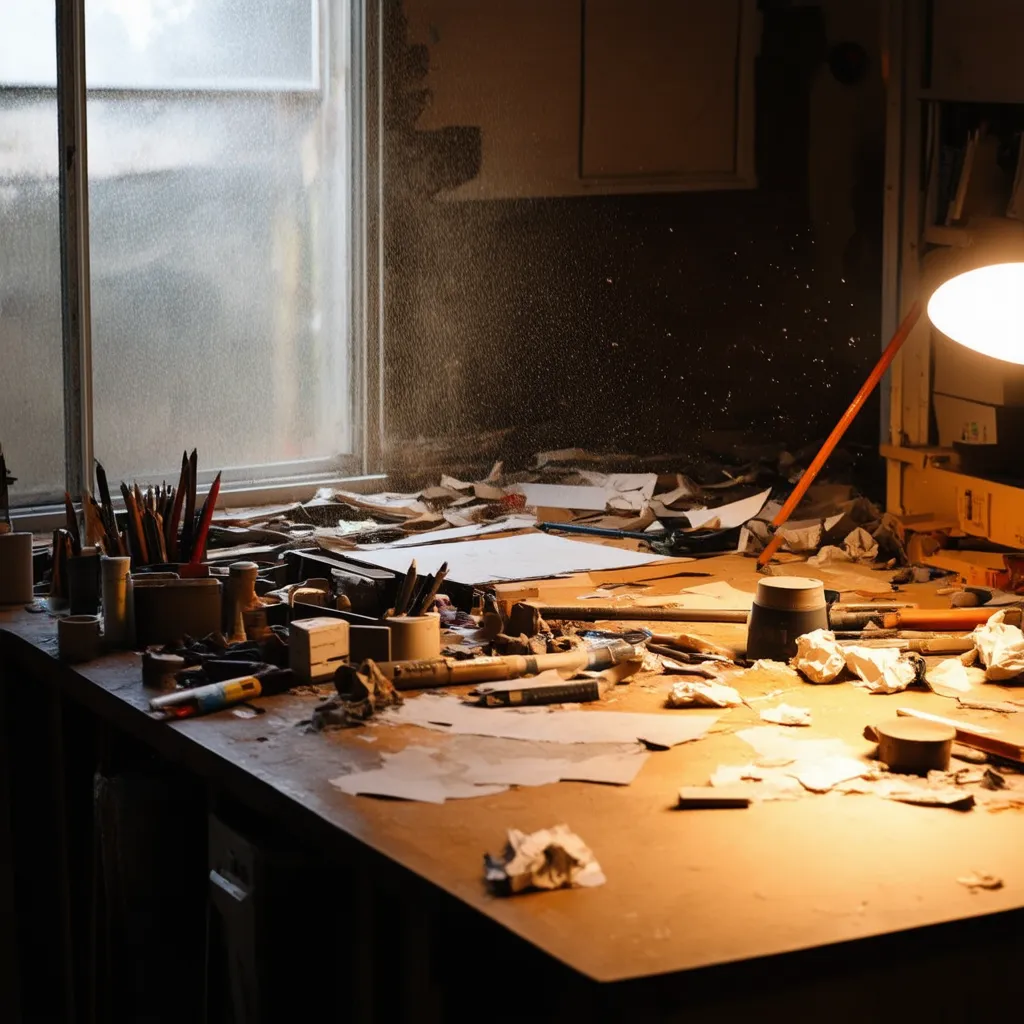
This test assesses the ability to reproduce real-world lighting, depth, and atmospheric effects. The prompt was designed to challenge the models with mixed lighting sources, airborne particles, and a high degree of object clutter.
Prompt: "A documentary style photograph of a cluttered messy artist workbench in a garage. Afternoon daylight streams in from a dirty window on the left, mixing with the warm light of the desk lamp on the right. Dust motes are visible dancing in the light rays. Pencils, dried paint tubes, crumpled paper, and tools are scattered everywhere. It feels chaotic and used."
- Qwen-Image: Assessed as the "best out of the four," this model was praised for looking "pretty realistic by every standard." It excelled at rendering the complex interaction between the two light sources and handled the scattered objects convincingly.

Qwen-Image
- FLUX.2: Produced an image that was "highly detailed and it's look almost photo realistic," with good object interaction and a strong sense of a recently used space. It effectively captured the atmospheric dust and window light.
FLUX.2
- HiDream-I1: Generated a photorealistic image but failed to fully adhere to the "messy" and "cluttered" aspects of the prompt. While objects were scattered, the overall scene lacked the specified chaotic feel.

HiDream-I1
- Stable Diffusion 3 Medium: Understood the "general purpose" of the prompt but failed to render distinct, understandable objects within the clutter. The individual items on the workbench were not clearly defined.
Stable Diffusion 3 Medium
Test 2: Text Rendering and Surface Integration
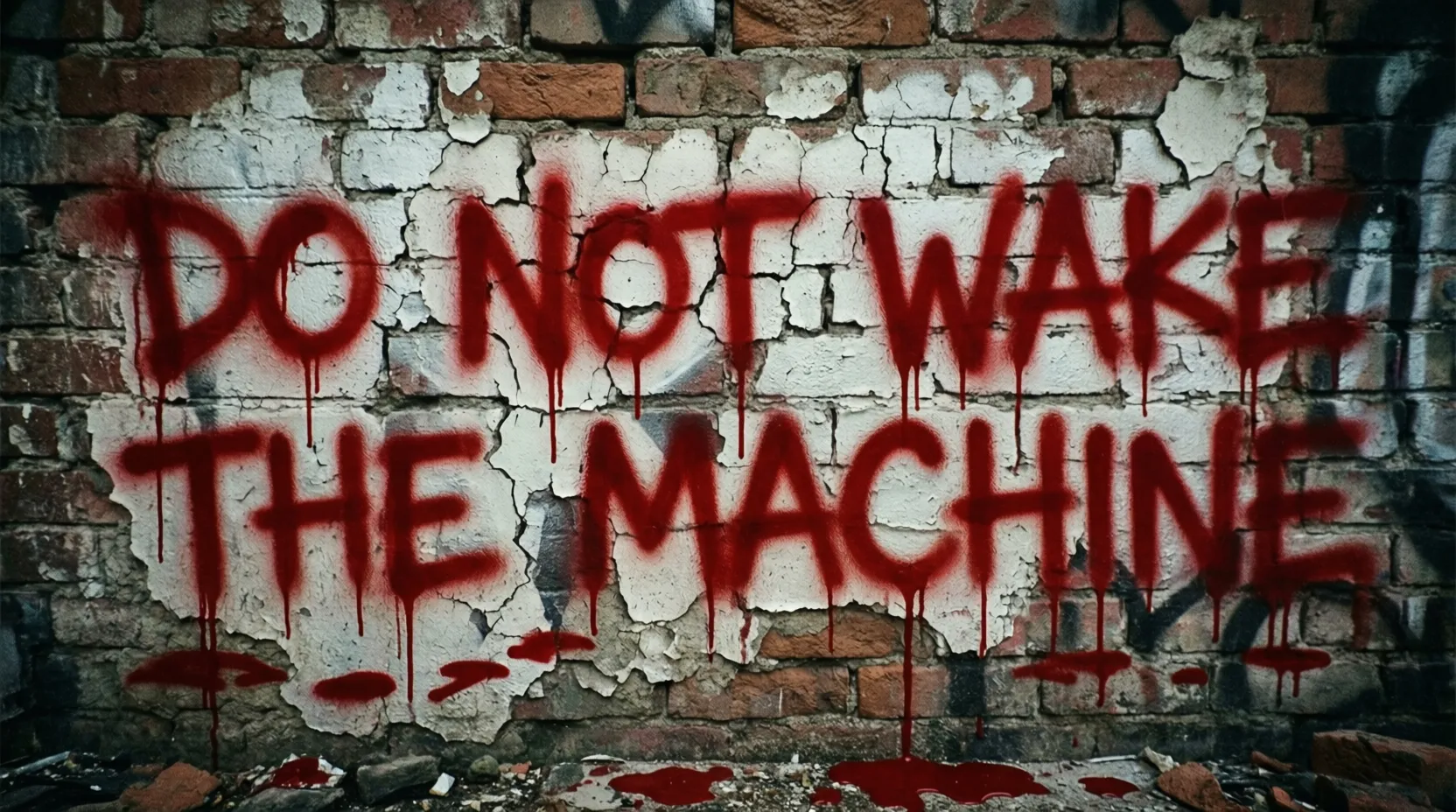
This test evaluates the accuracy of text rendering on a complex, textured surface, requiring the model to respect material properties, perspective, and a specific artistic style.
Prompt: "A closeup of a brick wall covered in peeling white brick paint. Spray painted hasty messy red aerosol paint across the bricks is the word 'do not wake the machine'. There are paint drips running down from the letters."
- Qwen-Image: Deemed "the most real" of the group. It successfully captured the "hasty manner" of the spray paint, showed realistic paint flow, and even rendered paint accumulation on the ground, adding to the image's authenticity.
Qwen-Image
- FLUX.2: Praised for generating text that looked "made by human" and for realistically rendering the paint's translucency as it mixed with the underlying brick wall texture.
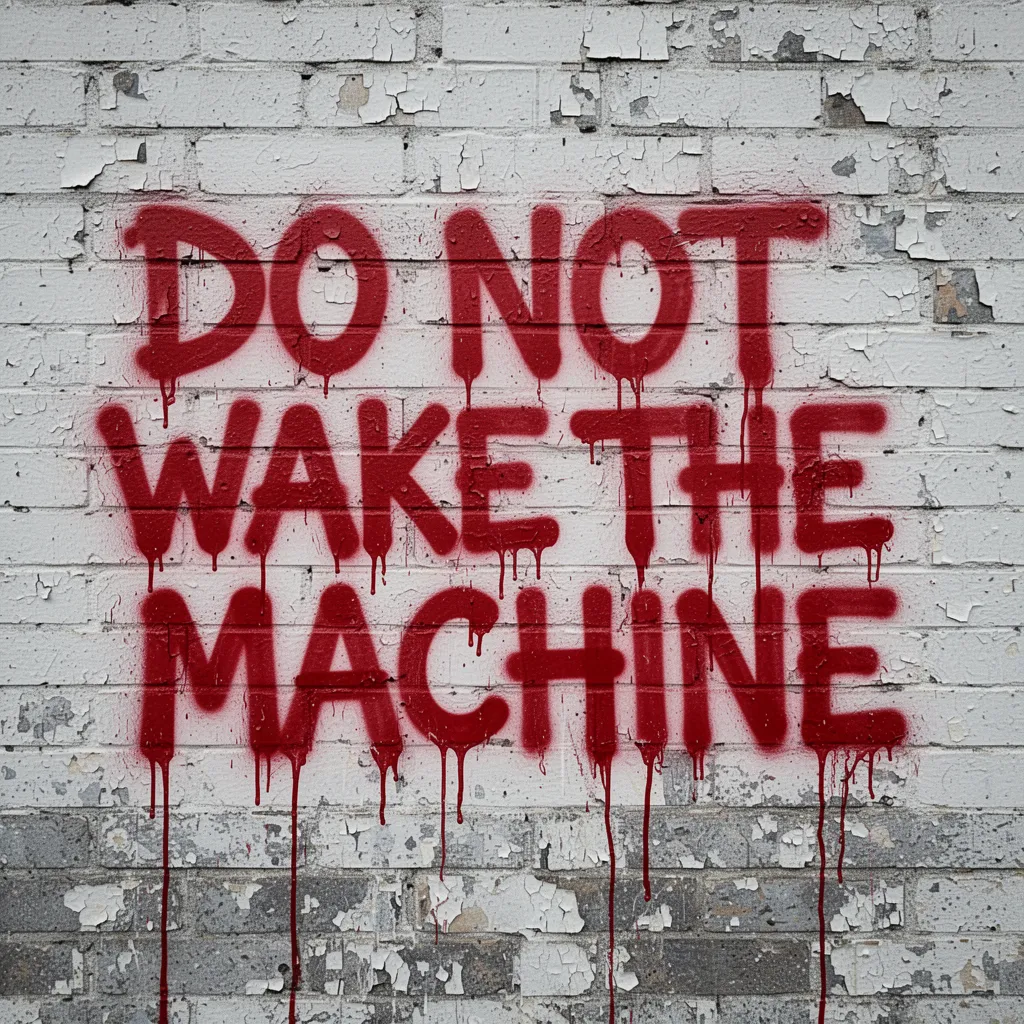
FLUX.2
- Stable Diffusion 3 Medium: Criticized for a significant error in the text, rendering "no" instead of "do not." The style of the text was also judged to look like it was "done by some stencil" rather than being hastily spray-painted.
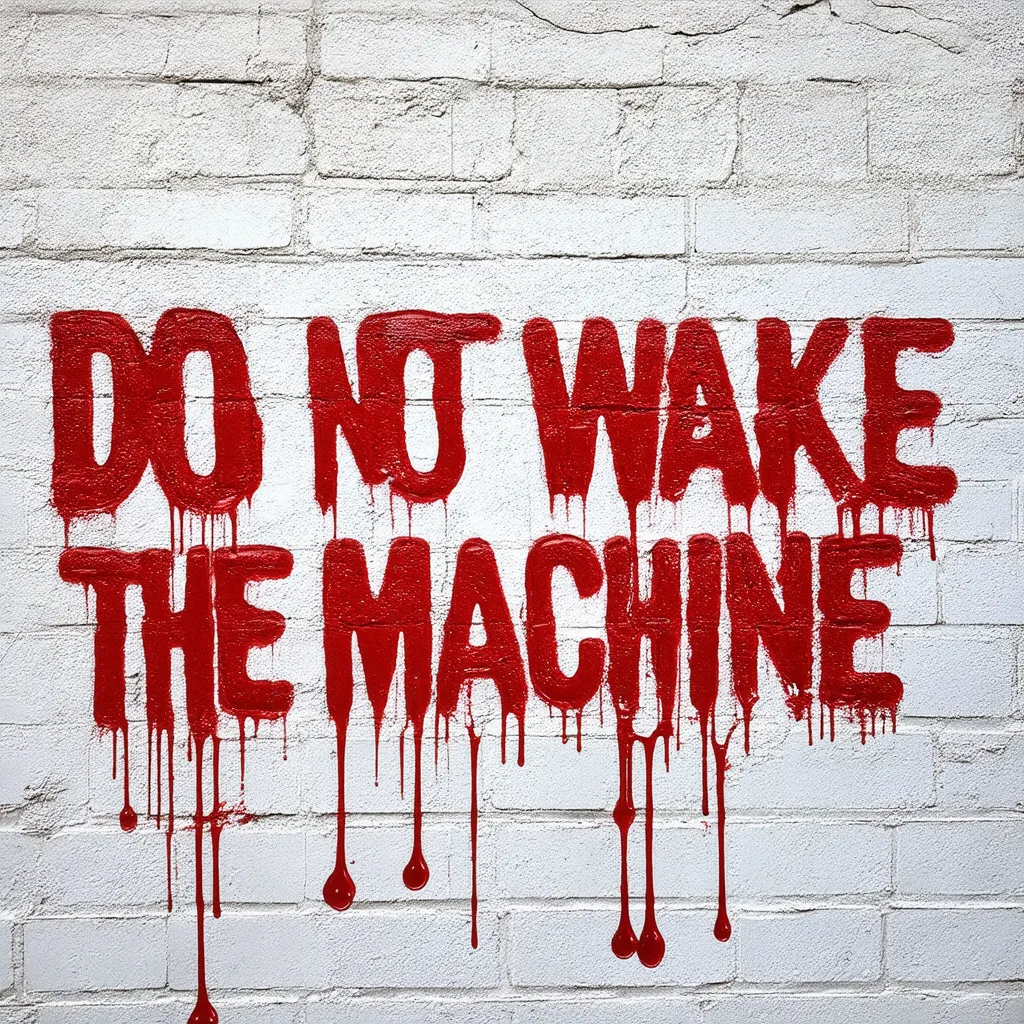
Stable Diffusion 3 Medium
- HiDream-I1: Judged the "worst out of imaginable," this model produced text that looked entirely machine-made and a wall that did not resemble brick, failing on both text accuracy and surface realism.
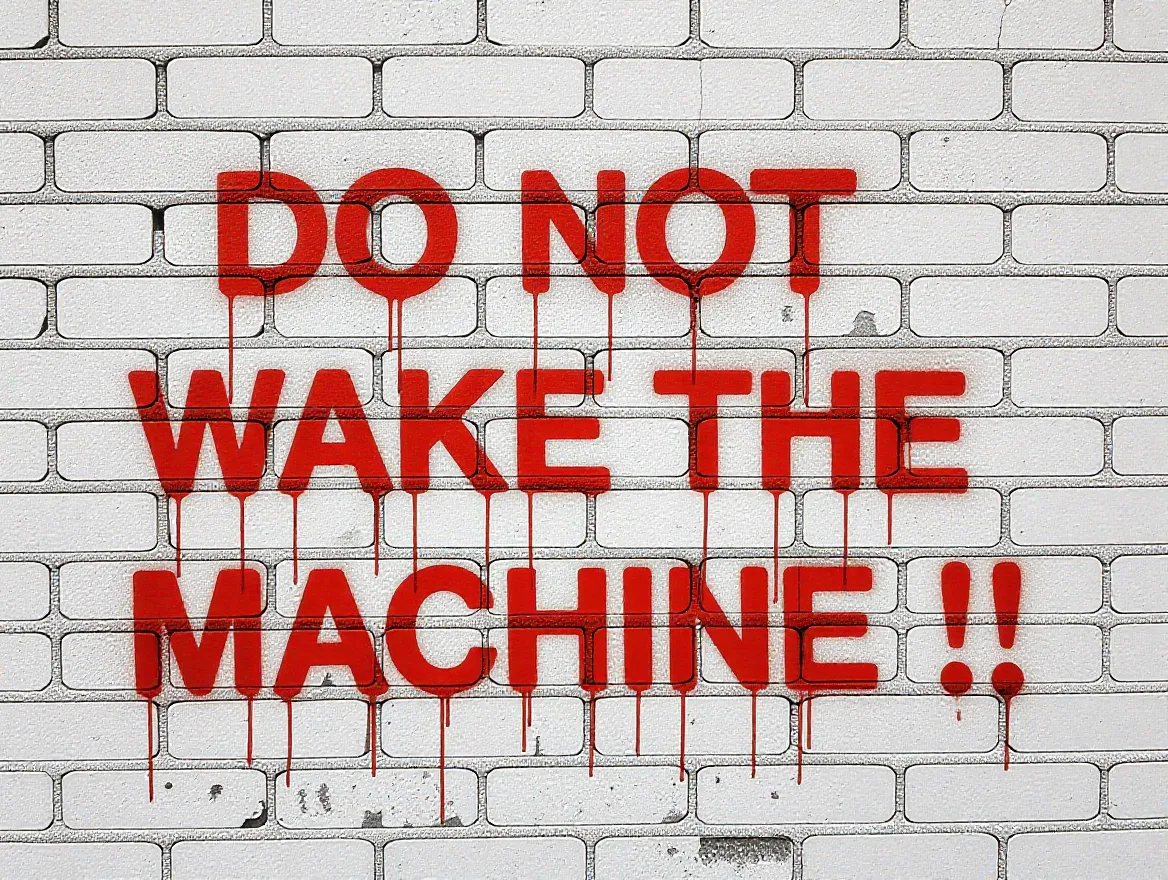
HiDream-I1
Test 3: Character and Contextual Adherence
This test measures the ability to preserve a well-known character's identity while placing them in an unusual context and requiring them to perform specific actions with specific details.
Prompt: "A photograph of a Darth Vader wearing a floral apron over his armor, standing in a suburban kitchen. He is holding a whisk and mixing batter in a bowl. There is flour dusting on his helmet. Daylight is coming through a window."
- FLUX.2: Assessed as having done a "great job." The image appeared realistic with proper lighting from the window and correctly included the specific detail of "flour dusting" on the character's armor.
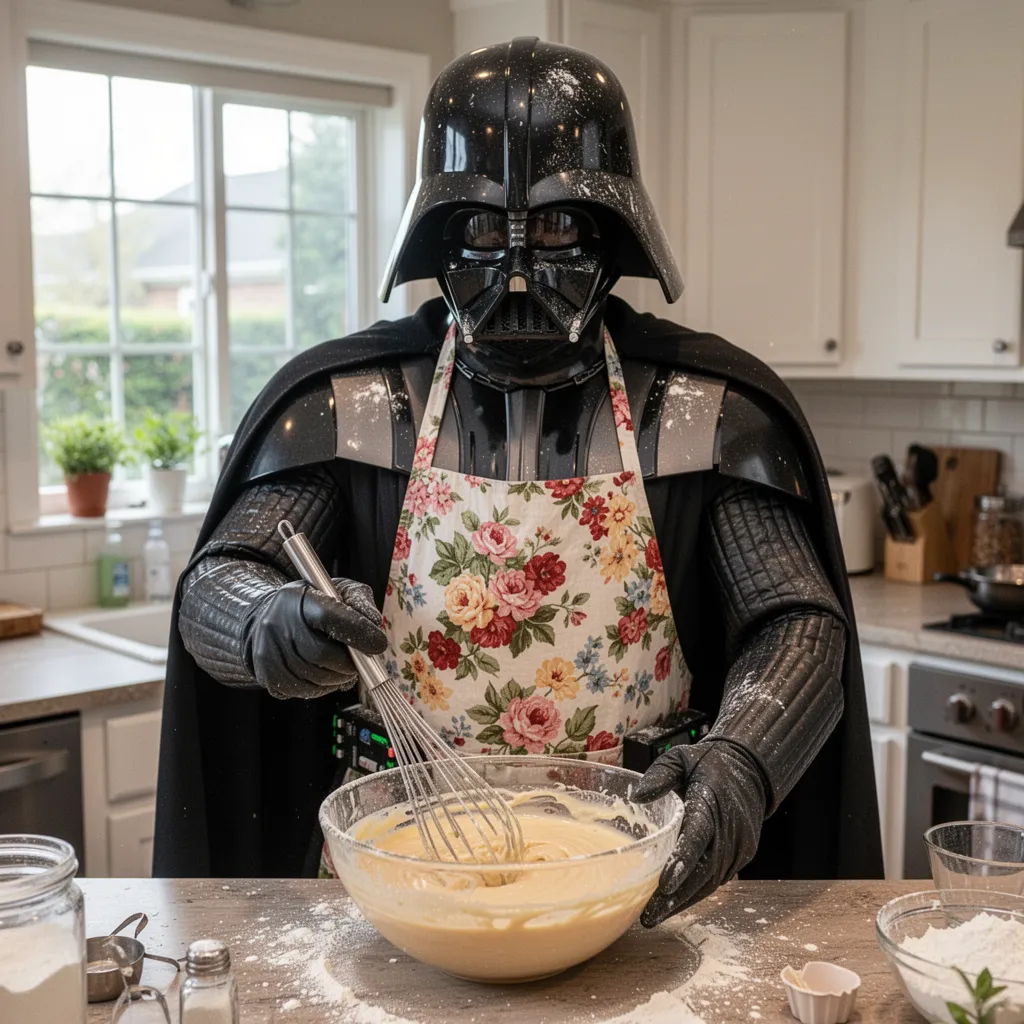
FLUX.2
- HiDream-I1: Praised for looking real and showing the character performing the specified action of mixing. However, it missed the key detail of "flour dust on his armor."
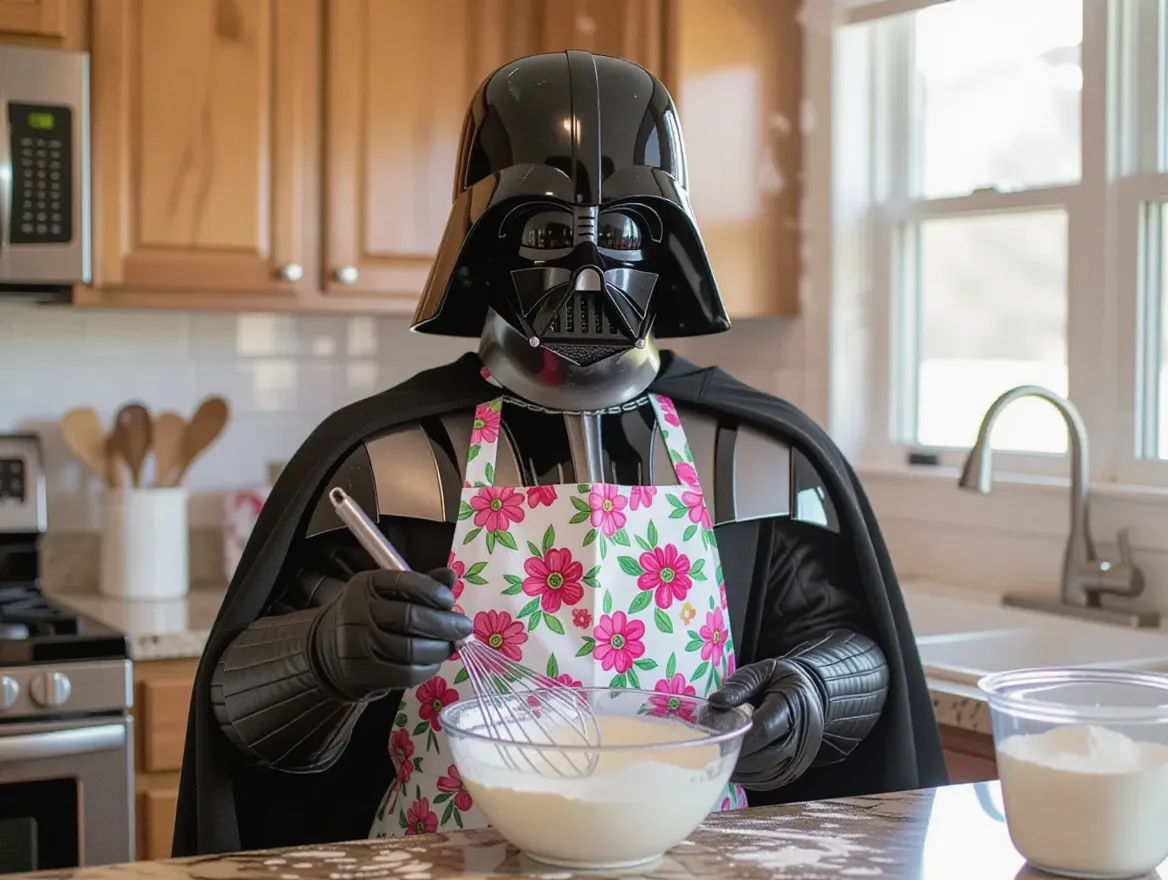
HiDream-I1
- Qwen-Image: Described as looking "very cinematic" and real, but the overall effect was considered "too plastic," detracting from the photorealism.
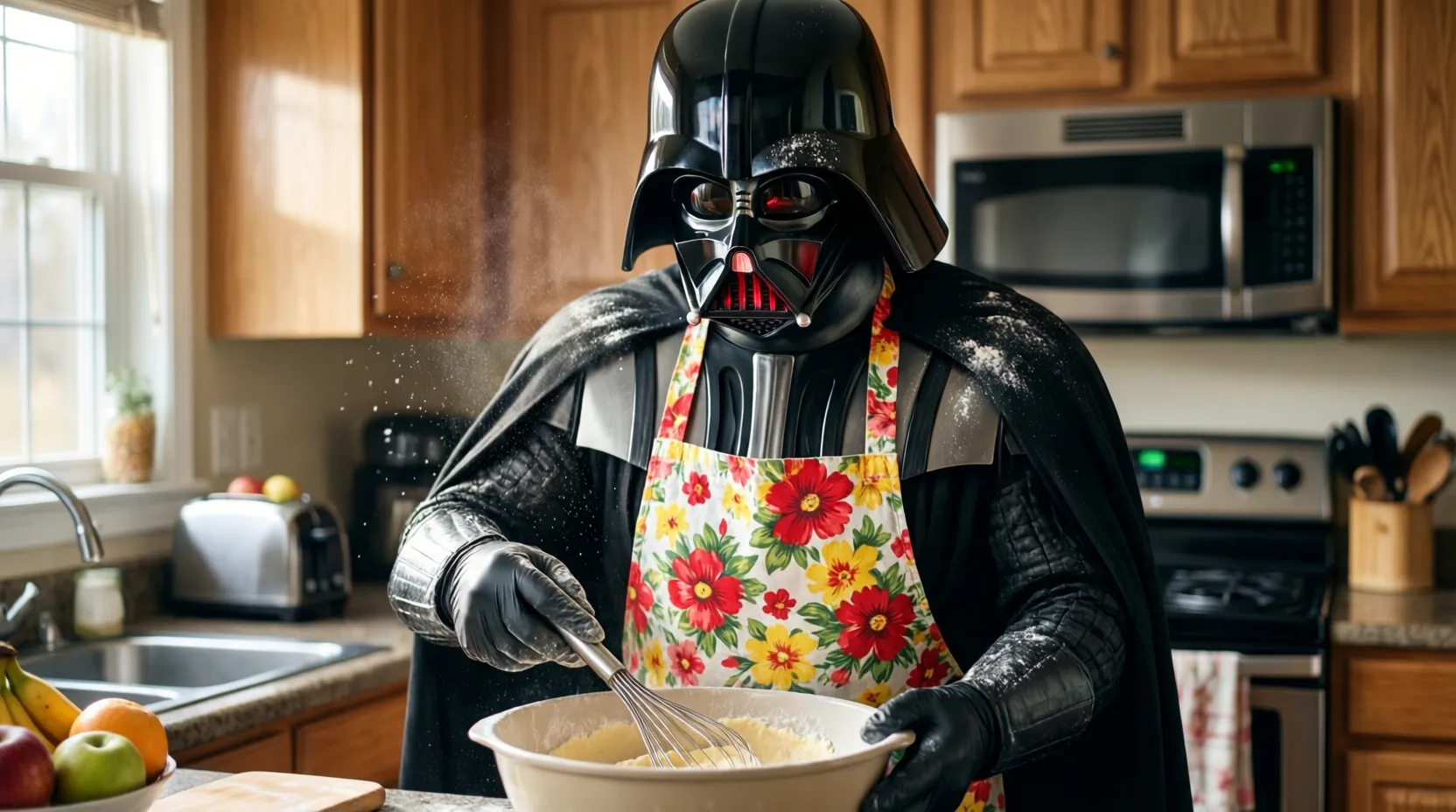
Qwen-Image
- Stable Diffusion 3 Medium: Criticized for generating an image that looked like "a replica standing in front of a bowl" rather than an active character performing the task of mixing, failing to capture the instructed action.
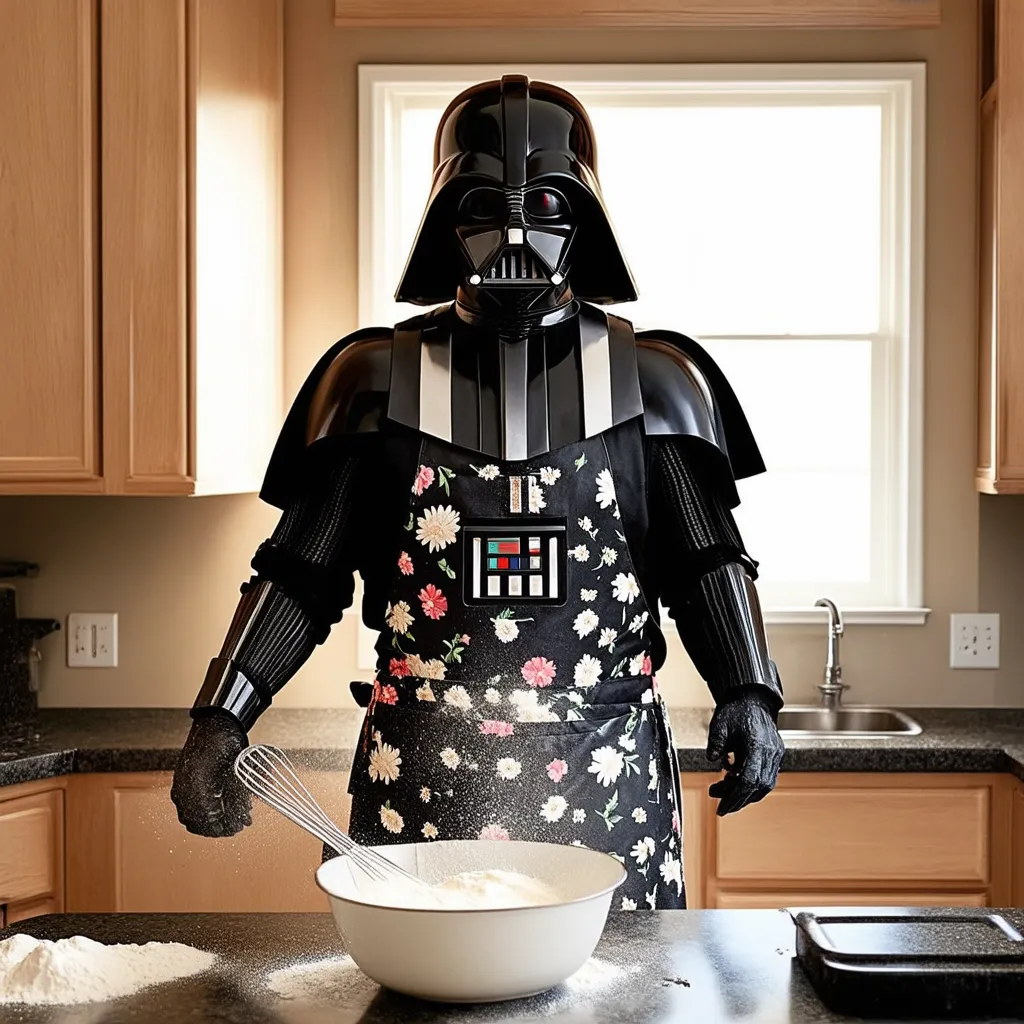
Stable Diffusion 3 Medium
These direct comparisons highlight the varying strengths of each model in core generation tasks. The following section moves beyond these general capabilities to explore the unique, specialized features that each model offers for specific production workflows.
Hardware Requirements and Deployment Considerations
The practical viability of any open-source model is heavily dependent on its hardware requirements. A model's theoretical capabilities are irrelevant if it cannot be run on available infrastructure.
The VRAM (Video RAM) footprint, in particular, is a critical factor for local deployment, often determining whether a model is accessible to hobbyists and smaller teams or is restricted to enterprise-level hardware.
This section provides a direct comparison of the hardware and setup complexities associated with each model to guide deployment decisions.
Model | Parameter Count | Minimum VRAM (Consumer Hardware) | Key Deployment Notes |
|---|---|---|---|
HiDream-I1 | 17B | >16GB (for fp8/GGUF versions) | Full version requires >27GB VRAM. Community reports from users on consumer 16GB cards highlight a steep learning curve and reliance on quantization (fp8/GGUF) for usability. |
FLUX.2 | Not specified | >16GB (for fp8/GGUF versions) | Full version has extremely high requirements, with community members citing 88GB of VRAM usage. This solidifies its position as a specialist tool for high-end, professional hardware. |
Qwen-Image | 20B | Not specified, but fp8/bf16 available | Offers quantized versions (fp8, bf16) to run on consumer hardware. Positioned as a "builder's tool" that requires pipeline management. |
Stable Diffusion 3 Medium | 2B | Low; designed for consumer GPUs | Explicitly marketed as resource-efficient and "perfect for running on consumer PCs and laptops." Easiest to deploy locally. |
This comparison highlights the significant trade-offs between model complexity and accessibility. While larger models like HiDream-I1 and FLUX.2 offer sophisticated features, they demand substantial hardware resources, often necessitating quantization (reducing model precision) to run on consumer-grade cards.
In contrast, Stable Diffusion 3 Medium is engineered from the ground up for efficiency, making it the most straightforward option for local deployment. The following section will synthesize these findings into a final set of recommendations.
Conclusion: A Use-Case-Driven Recommendation
This comparative analysis demonstrates that the open-source text-to-image landscape is diverse and specialized. The investigation into the architecture, performance, and hardware requirements of Qwen-Image, HiDream-I1, FLUX.2, and Stable Diffusion 3 Medium confirms that no single model is universally "best."
The optimal choice is contingent entirely on the specific use case, available hardware, and the required level of creative control. Based on the evidence presented, the following recommendations can be made.
- For Maximum Accessibility and Customization: Recommend Stable Diffusion 3 Medium. Its low 2-billion-parameter size makes it the definitive choice for users on consumer-grade hardware or those who prioritize ease of fine-tuning and experimentation.
- For Professional Marketing and E-commerce: Recommend FLUX.2. Its unparalleled production features, including multi-image reference for character consistency, exact HEX color code support for branding, and JSON controls for repeatable workflows, make it the superior tool for enterprise-level marketing and design.
- For Reliable Text-Heavy Applications and UI Mockups: Recommend Qwen-Image. Positioned as the "builder's tool," its superior text rendering, layout consistency, and strong multilingual capabilities make it the most reliable option for generating infographics, presentations, and UI mockups.
- For Complex Scene Generation on High-End Hardware: Recommend HiDream-I1. It is best suited for users with sufficient VRAM who need to parse highly complex semantic prompts and leverage its sophisticated four-encoder architecture for maximum detail and prompt adherence in intricate scenes.
FAQs
How do open-source text-to-image models differ from closed-source models?
Open-source models provide full control over weights, pipelines, and deployment, enabling fine-tuning, transparency, and data privacy, unlike closed systems with fixed APIs and restrictions.
Which open-source image generation model is best for consumer-grade hardware?
Stable Diffusion 3 Medium is best suited for consumer GPUs due to its low 2B parameter size and optimized VRAM usage.
Are open-source text-to-image models suitable for enterprise production workflows?
Yes. Models like FLUX.2 and Qwen-Image offer advanced controls, text accuracy, and consistency features suitable for professional and enterprise-grade use cases.

Simplify Your Data Annotation Workflow With Proven Strategies
.png)